Hiding dash cam wires can be a tricky task, especially if you want a neat look but do not want to remove any interior trim from your car. Many drivers want the safety and peace of mind a dash cam provides, but messy wires can make your car look unorganized and even distract you while driving.
The good news is you can hide dash cam wires effectively without removing trim or using special tools. This article will guide you through every step, share practical advice, highlight common mistakes, and provide tips that even seasoned car owners sometimes overlook.
Why bother with hidden wires? Besides aesthetics, well-hidden wires reduce the risk of accidental snags, lower the chances of theft (since the dash cam setup looks more professional and less obvious), and help you avoid electrical problems from improper installation.
Let’s dive into how you can achieve a clean, safe, and almost invisible dash cam installation—all without taking apart your car’s interior.
Understanding Dash Cam Wiring Basics
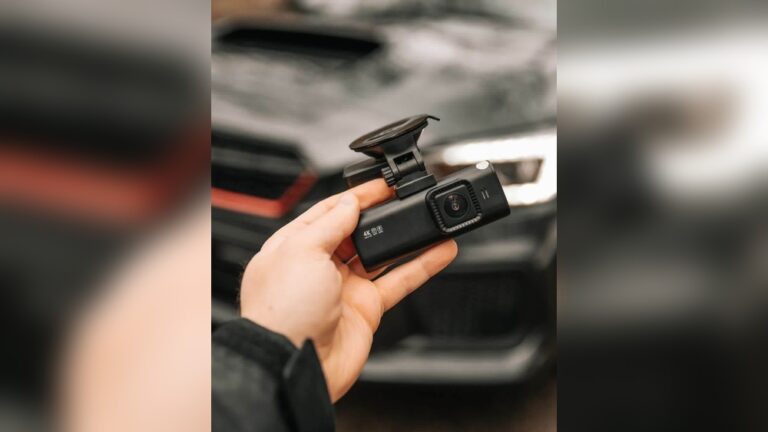
Before you start, it helps to know what you’re dealing with. Most dash cams use a simple power cable that runs from the camera (usually on the windshield) to a power source. This is often the 12V cigarette lighter socket or, for hardwired models, a connection to the car’s fuse box.
Dash cam power cables are thin, usually black, and between 3 to 5 meters long. Some cameras also have a separate rear camera wire or GPS module. The challenge is to hide these wires so they’re not hanging or visible.
Tools And Materials You’ll Need
You don’t need special tools, but having the right materials makes the job much easier. Here’s what you should gather:
- Dash cam power cable (included with your camera)
- Cable clips with adhesive backs
- Flexible wire covers (optional, for extra protection)
- Plastic pry tool (optional, but you won’t use it to remove trim)
- Zip ties (small size)
- Electrical tape (for securing loose parts)
- Measuring tape (optional, for planning cable length)
- Alcohol wipes (for cleaning surfaces before sticking clips)
Having these items handy lets you work efficiently and avoid stopping mid-way.
Planning Your Wire Route
Before you start hiding wires, spend a few minutes planning. Think about where your dash cam sits and where the power source is located. Most people mount the dash cam behind the rearview mirror and use the 12V socket near the gear shift or under the dashboard.
Trace the path you want the wire to follow. Usually, the neatest route is:
- Up from the camera, tucking the wire behind the headliner (the fabric just above the windshield).
- Down the A-pillar (the side of the windshield, near the driver or passenger door).
- Across the dashboard edge or under the glove box.
- Into the center console to reach the 12V socket.
If your dash cam has a rear camera, plan for a second cable to run along the headliner to the back window.
Step-by-step Guide: Hiding Dash Cam Wires Without Removing Trim
1. Clean The Surfaces
Before sticking anything inside your car, use alcohol wipes to clean the path where the wire will run. Dust, oil, and dirt can cause adhesive clips to fall off over time. Let it dry completely before moving to the next step.
2. Tuck Cable Behind The Headliner
Most headliners have a small gap between the glass and the fabric or plastic. Gently push the dash cam wire into this gap using your fingers. If the gap is tight, use a plastic pry tool—but never force it. The headliner is flexible and will usually hold the cable securely.
Non-obvious tip: Push only a few centimeters of wire at a time. Trying to shove a long section can bend or damage the cable.
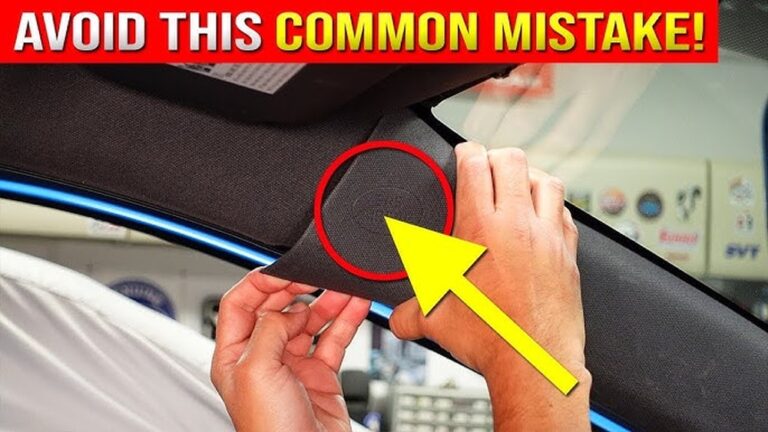
3. Run Wire Down The A-pillar
The A-pillar is the area between your windshield and front door. There’s usually a small gap between the plastic trim and the body. Slide the wire carefully into this gap using your fingers. Work slowly, inch by inch.
If the gap is tight, you can use a plastic card (like a loyalty card) to gently press the wire in. Never use metal tools, as they can damage airbags or scratch the trim.
Key insight: Always run the wire on the edge furthest from any airbags. Most cars have curtain airbags inside the A-pillar. Keeping the wire toward the windshield side avoids problems if airbags deploy.
4. Hiding Wire Along The Dashboard Edge
Where the A-pillar meets the dashboard, the wire needs to cross to the lower dashboard or glove box area. Here, you have two options:
- Tuck the wire under the rubber door seal. Gently pull back the seal, push the wire in, and press the seal back.
- Use adhesive cable clips. Stick these along the edge where the dashboard meets the door or glove box. Make sure the clips are close enough to keep the wire flat and hidden.
5. Securing Wire Under The Glove Box
Once the wire reaches the lower dashboard or glove box, you can use small zip ties to bundle excess cable and keep it out of sight. Look for existing wires or brackets under the glove box. Zip tie the dash cam cable to these points.
Avoid blocking the glove box or interfering with any car controls.
6. Connecting To Power
Plug the cable into your 12V socket or USB port. Coil any extra cable neatly and secure it with a zip tie or cable clip. Tuck the coiled cable behind or under the center console, where it won’t be visible or get in the way.
7. Final Touches
Check that the wire is fully hidden along its path. Sit in both front seats and look from different angles. If you see any sagging or loose wires, use more adhesive clips or tape to hold them in place.
Test your dash cam to make sure it powers on and records properly. If the cable falls or becomes loose after a few days, re-clean the surface and try a new adhesive clip.
Alternative Methods For Special Cases
Sometimes, the usual tucking and clipping methods don’t work—maybe your car’s trim is extra tight, or the cable is too stiff. Here are some extra tricks:
- Flexible wire covers can hide cables along door edges or under the dashboard. These are small plastic channels with adhesive backs.
- Velcro strips can secure wires under seats or behind panels where clips won’t stick.
- Magnetic cable holders (for cars with metal surfaces) can keep wires in place along the dashboard.
These solutions are especially useful for cars with unique interior shapes or very tight trim.
Comparing Common Dash Cam Power Sources
Choosing where to power your dash cam affects how you route and hide wires. Here’s a comparison of the most common options:
| Power Source | Ease of Hiding Wires | Installation Difficulty | Pros | Cons |
|---|---|---|---|---|
| 12V Socket | Easy | Very Low | No wiring skills needed, quick setup | Wire may be visible at center console |
| USB Port | Easy | Very Low | Clean look, less bulky plug | Some cars have weak USB power |
| Hardwired (Fuse Box) | Moderate | Medium | Wire can be almost invisible, runs with ignition | Needs more skill, risk if not done carefully |
For most people, the 12V socket is the simplest. If you want a totally hidden setup, hardwiring might be better, but it’s best done by a professional if you’re unsure.
Credit: www.blackboxmycar.com
Mistakes To Avoid
Many dash cam owners make common errors when trying to hide wires. Here’s what you should watch out for:
- Stretching the cable too tight. Wires need a little slack to avoid stress or breakage when you adjust the camera or move the seats.
- Blocking airbags. Always route wires away from airbag panels, especially in the A-pillar and dashboard sides.
- Using poor-quality adhesive clips. Cheap clips often fall off, especially in hot or cold weather. Invest in automotive-grade clips.
- Forgetting about cable expansion. Wires can expand or contract with temperature changes. Leave a little extra length in hidden areas.
- Ignoring moving parts. Make sure wires don’t get pinched by door hinges or seat tracks.
Cable Management Tips For A Professional Look
If you want your dash cam installation to look factory-made, follow these extra tips:
- Match cable color to your interior. Black cables blend in best with most headliners and dashboards.
- Hide excess cable out of sight. Don’t coil wires in visible spots. Under the glove box or behind the center console is best.
- Cut zip tie ends flush. Long zip tie tails look messy and can scratch you or your passengers.
- Use wire loom if you have multiple cables. A single cover makes everything look tidy.
When To Consider Professional Help
Some cars have very tight trim, delicate airbags, or complex dashboards. If you:
- Feel uncomfortable working around airbags
- Can’t access the route you need with fingers alone
- Want a hardwired setup for parking mode
…it’s smart to ask a pro installer. A professional can hide wires perfectly, avoid damage, and ensure your camera works safely.
Dash Cam Wire Types And Best Practices
Not all dash cam cables are the same. Here’s a quick comparison:
| Cable Type | Best For | Hiding Difficulty | Notes |
|---|---|---|---|
| Micro USB | Older dash cams | Easy | Standard, flexible |
| Mini USB | Budget models | Easy | Shorter, sometimes stiffer |
| USB-C | Newer dash cams | Very Easy | Flexible, reversible |
| Proprietary | High-end models | Varies | May be thicker or less flexible |
Flexible cables are much easier to hide without removing trim. If your cable is thick or stiff, try warming it gently with your hands or a hairdryer before installation—this makes it more flexible and easier to tuck.

Credit: www.youtube.com
Real-world Example: Hiding Wires In A Compact Sedan
Let’s look at an example. Sarah drives a 2020 Honda Civic and wants her dash cam to look as invisible as possible. Here’s how she did it without removing trim:
- Mounted the camera just behind the rearview mirror.
- Tucked the power cable into the headliner using her fingers, moving slowly across the windshield.
- Ran the wire down the A-pillar, keeping it close to the glass and away from the airbag label.
- Used adhesive cable clips to guide the wire along the edge of the dashboard, behind the glove box.
- Secured excess cable under the glove box with a zip tie.
- Plugged into the 12V socket in the center console and tucked the plug area under the dash lip.
Sarah’s installation took about 25 minutes, and only a few centimeters of wire show near the camera mount. She avoided all trim removal and kept her car’s interior clean and safe.
Frequently Missed Details
Even experienced car owners sometimes miss small but important points:
- Check for wire movement after a few days. Vibrations can loosen wires. Inspect and adjust as needed.
- Be aware of temperature changes. In hot weather, adhesives can soften. Choose clips rated for automotive use.
- Leave access to camera buttons or SD card slots. Don’t block these with cables or clips—you’ll need to reach them for updates or file transfers.
Quick Reference: Steps To Hide Dash Cam Wires
- Plan your route from camera to power source.
- Clean all surfaces along the wire path.
- Tuck wire behind the headliner above the windshield.
- Guide wire down the A-pillar, avoiding airbag zones.
- Use adhesive clips or tuck under rubber seals along the dashboard.
- Secure loose wire under the glove box or center console.
- Connect to power and tidy up excess cable.
- Double-check from all angles for visible wire.
- Test the dash cam to ensure power and recording.
Practical Tips For Different Car Types
- For SUVs or trucks: Longer cable runs mean more clips or zip ties. You may need extension cables.
- For cars with curved dashboards: Use more adhesive clips to follow the curve without leaving slack.
- For older vehicles: Trim gaps are often wider, making tucking easier.
- For luxury cars: Use only high-quality clips to avoid damaging sensitive materials.
How Hidden Wires Improve Dash Cam Security
A well-hidden dash cam setup does more than look neat. It also:
- Reduces theft risk: Obvious wires signal to thieves that a dash cam is installed. Hidden wires make it less tempting.
- Prevents accidental unplugging: Passengers are less likely to kick or pull hidden wires.
- Improves reliability: Wires that don’t move or get pinched last longer and keep your camera recording.
Dash Cam Wire Hiding: Myths Vs. Reality
There’s a lot of advice online about dash cam installation. Let’s clear up some common myths:
- Myth: “You must remove trim for a clean look.”
Reality: Most cars have enough gaps for wires; trim removal is rarely needed for neatness.
- Myth: “All adhesive clips damage your car.”
Reality: Automotive-grade clips are designed to be removable without leaving marks.
- Myth: “You can hide any length of wire in the headliner.”
Reality: Only a few centimeters will fit—the rest must be routed elsewhere.
Understanding these points saves you time and keeps your installation safe.
Where To Buy Reliable Dash Cam Accessories
For the best results, buy automotive-grade adhesive clips, flexible wire covers, and small zip ties from trusted stores or online retailers. Avoid generic clips intended for home use—they may not hold up to car temperature swings.
For more on dash cam accessories, check reputable guides like Autoblog’s accessory recommendations.
For more solutions like this, check our complete Dash Cams troubleshooting guides.
Final Thoughts
Hiding dash cam wires without removing trim is possible for almost every car and driver. With a little planning, the right materials, and careful installation, you can achieve a clean, professional look that keeps your car organized and safe. Remember to always avoid airbag zones, use quality clips, and check your work from every angle.
These small steps make a big difference in the long-term performance and appearance of your dash cam setup.
If you ever feel unsure, it’s always smart to ask for help from a professional installer—especially for hardwired or parking mode setups. But for most people, following the steps in this guide will give you a neat, nearly invisible installation.
FAQs About How to Hide Dash Cam Wires Without Removing Trim
How Do I Hide Dash Cam Wires If My Car’s Trim Is Very Tight?
Use your fingers or a plastic card to gently push the wire into any available gap. If the trim is too tight, run the wire along the edge and secure it with adhesive clips. Avoid forcing the wire, as this can damage the cable or trim.
Will Adhesive Clips Damage My Car’s Interior?
High-quality automotive adhesive clips are designed to come off cleanly. To avoid marks, always clean the surface before sticking and remove clips slowly if needed. Cheap clips or sticky tape can leave residue or pull off paint.
Is It Safe To Run Dash Cam Wires Near Airbags?
You should never run wires directly over or inside airbag panels, especially the A-pillar. Always keep wires on the windshield side of the trim to avoid interfering with airbag deployment. If unsure, check your car’s manual or ask a professional.
What If My Dash Cam Cable Is Too Short?
You can buy extension cables for most dash cams. Match the connector type (USB, mini USB, or USB-C) and make sure the extension is automotive-grade to handle the car’s temperature changes.
Can I Use The Same Steps For A Rear Dash Cam?
Yes, the basic steps are the same. For a rear camera, route the cable along the headliner, down the C-pillar, and across the trunk or hatch area. Use clips and zip ties as needed, and avoid blocking airbags or cargo space.

I am Julian Drive, an automotive enthusiast and repair expert with over 7 years of hands-on experience in vehicle maintenance. At Carora Hub, I simplify complex car issues into easy-to-follow DIY guides to help drivers stay safe and save on repair costs.