Is your Toyota Sienna’s check engine light turning on and leaving you worried? You’re not alone.
That little warning can be confusing and stressful, but you don’t have to panic. I’ve dealt with this on my own Sienna and helped friends with theirs. You can often diagnose and reset the check engine light yourself. In this guide, I’ll walk you through clear, step-by-step ways to reset the check engine light on a Toyota Sienna—no confusing jargon, just practical steps and tips.
You’ll learn when a reset is safe, which tools work best, how to read common trouble codes (DTCs), and when to see a pro. By the end, you’ll feel confident about handling this routine problem and protecting your vehicle’s health.

Credit: www.youtube.com
Why Check Engine Light Comes On
The check engine light (also called the MIL — Malfunction Indicator Lamp) is your car’s way of saying the engine control unit (ECU) found a problem. It can mean anything from a loose gas cap to a serious engine misfire. The light’s job is to alert you before a small fault becomes a big repair bill. I always treat the light as a cue to check codes and act quickly.
Common Causes In Toyota Sienna
On Toyotas, and the Sienna specifically, the most common triggers are simple to fix. Here are the frequent culprits I see:
- Loose or damaged gas cap (EVAP system leak). This is quick to fix and often the cause of an intermittent light.
- Faulty oxygen (O2) sensor. A worn sensor affects fuel mix and emissions and can throw codes like P0130–P0167.
- Worn spark plugs or bad ignition coils. These can cause misfires (P0300–P0304) and rough running.
- Clogged or failing catalytic converter. Codes such as P0420 often point here and can affect power and emissions.
- Mass air flow (MAF) sensor or intake leaks. These affect air/fuel balance and driveability.
Quick note on diagnostics
When the light comes on, the ECU stores diagnostic trouble codes (DTCs). Those codes guide repairs. I always read and write down the codes before clearing them. That way I can check if the issue returns.
Impact On Vehicle Performance
A check engine light can mean worse fuel economy. Your Sienna may use more gas. You might notice slower acceleration or rough idling. In some cases, the engine may stall or run poorly. Emissions can rise, which may cause a failed smog test. Letting a warning go too long can damage parts like the catalytic converter. I learned this the hard way once—addressing a light early saved me a big bill later.
You May Like This Article More: Toyota Sienna Dashboard Warning Lights Explained
Tools Needed For Reset
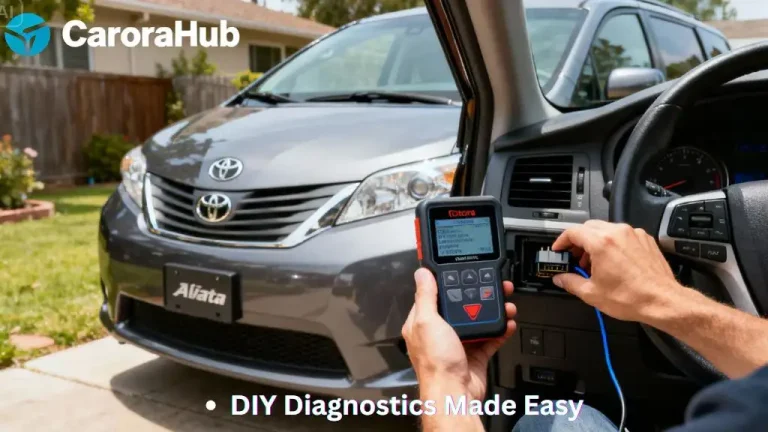
To reset the check engine light you need the right tools. The best option is an OBD-II scanner. It reads the car’s stored DTCs and clears them safely. I keep a compact scanner and a Bluetooth adapter in my glove box. Both work well, depending on how much detail I need.
OBD-II Scanner Options
OBD-II scanners range from basic code readers to advanced diagnostic tools. For most Sienna owners, a basic handheld scanner does the job. These devices read DTCs, display freeze-frame data, and clear codes. More advanced scanners give live data, pending codes, and readiness monitors.
My recommendations:
- Basic handheld reader — great for reading and clearing codes. No phone needed.
- Bluetooth OBD-II adapter + phone app — convenient and often shows more data. Good apps include Torque, OBD Auto Doctor, and Car Scanner.
- Advanced professional scanner — useful for in-depth diagnostics, bidirectional controls, and live sensor graphs. Best left to shops or experienced DIYers.
All of these plug into the OBD-II port, located under the dash on the driver’s side.
Alternative Tools And Apps
Bluetooth adapters paired with smartphone apps are a modern, low-cost option. They let you view codes, live sensor data, and emissions readiness. I often use this setup when I’m on the road and want a quick check. Be sure to pick a reliable adapter (avoid very cheap clones) and a well-rated app.
Some apps are free and cover basic functions. Paid apps add features such as graphing, code lookups, and exportable reports. These help if you need to share diagnostics with a mechanic.
Step-by-step Reset Process
Resetting the check engine light is straightforward when you follow a clear process. Below I give the exact steps I use. I always read the codes first. Clearing the light without fixing the fault only hides the problem temporarily.
Preparing Your Vehicle
Before you start, park on a flat surface. Turn the engine off and remove the key. Open the hood and check battery terminals—clean and tight connections help avoid false faults. Close doors and windows to avoid interior power draws while you work. Have a pen and paper to note codes. If you use a phone app, ensure your phone is charged.
Using An Obd-ii Scanner
Step-by-step with a scanner:
- Locate the OBD-II port under the dash, near the steering column.
- Plug the scanner or Bluetooth adapter into the port firmly.
- Turn the ignition to the ON position (do not start the engine).
- Follow the scanner or app menu to select vehicle make/model if prompted.
- Choose “Read Codes.” Record the codes and any freeze-frame data. Write them down or take a photo.
- Use an online code database or the scanner’s built-in guide to understand possible causes. Common P-codes for Sienna include P0420 (catalyst), P0171/P0174 (fuel trim), and P0300–P0304 (misfires).
- If you’ve fixed the issue, select “Clear Codes” or “Erase DTCs.” Wait for the scanner to confirm the action.
- Turn off the ignition, unplug the scanner, then start the engine and drive. Some systems require a few drive cycles before all monitors return to “ready.”
Important: If the light blinks rapidly while driving, this indicates an active misfire. Stop driving and get the vehicle inspected. A blinking light can damage the catalytic converter quickly.
Manual Reset Methods
There are manual ways to clear the light, but each has trade-offs.
- Battery disconnect method: Turn off the engine. Disconnect the negative battery cable with a wrench for about 15 minutes. This clears the ECU memory and can reset the light. Reconnect the cable tightly. Start the engine and check the dash. Note: this may erase radio presets, clock settings, and seat memory.
- Drive cycle method: Fix the root cause and drive the car for several days. Many issues clear once the ECU sees normal sensor data across multiple drive cycles. This is safe but slower.
Warning: Rapidly disconnecting the battery on modern vehicles can cause other electronic issues. Use the battery method sparingly. I usually prefer using an OBD-II tool to clear codes cleanly.
Interpreting codes after reset
After clearing codes, don’t assume the issue is gone. If the light returns, read the new codes right away. Persistent or repeated codes tell you the fault hasn’t been fixed. Keep logs of codes and repairs—this helps if you later visit a mechanic.

Credit: www.woburntoyota.com
When To Visit A Mechanic
Some issues need a pro. I’ll tell you how I decide to take a Sienna to the shop. If you follow these guidelines, you’ll avoid unnecessary visits and prevent damage from delaying repairs.
Signs you should see a mechanic quickly:
- The check engine light stays on after a proper repair and reset.
- The light is blinking or the car runs very rough—possible active misfires.
- Loss of power, stalling, or persistent drivability issues.
- Emissions test failures or codes indicating catalytic converter damage (e.g., P0420).
Persistent Warning Lights
When a light comes back right after clearing, the root cause persists. Mechanics can run smoke tests for EVAP leaks, perform cylinder balance tests, and use advanced scanners to track intermittent faults. If you’ve already replaced simple parts (like a gas cap or spark plugs) and the light remains, get professional help.
Complex Engine Issues
Complex problems—fuel system faults, transmission-related DTCs, or internal engine issues—need shop tools and expertise. Mechanics have OEM-level scanners and the experience to diagnose root causes without guesswork. Don’t try complicated fixes beyond your skill level; they can make things worse.
What to tell your mechanic
When you call or visit, tell them:
- The exact DTCs you recorded (e.g., P0302, P0420).
- When the light first appeared and whether it is steady or flashing.
- Any symptoms: rough idle, loss of power, poor fuel economy, smell of fuel, or smoke.
- Recent work you did on the vehicle (spark plugs, fuel filter, battery disconnect, etc.).
Read More: How to Check Tire Pressure in Toyota Sienna
Preventing Future Check Engine Alerts
Prevention is the best approach. Small, regular steps keep your Sienna running well and reduce surprise warnings. I follow a simple checklist and recommend you do the same.
Regular Maintenance Tips
- Change engine oil and filter on schedule. Clean oil protects sensors and moving parts.
- Replace the air filter regularly to ensure proper airflow to the engine.
- Check and replace spark plugs and ignition coils when worn—this prevents misfires.
- Use quality gasoline and consider periodic fuel system cleaner treatments if recommended.
- Inspect belts, hoses, and vacuum lines for cracks and leaks.
- Check the gas cap and EVAP hoses—small leaks here commonly trigger the MIL.
- Follow the maintenance schedule in your owner’s manual and log service dates.
Monitoring Vehicle Health
Keep an OBD-II reader handy. Scan for codes every few months or after any odd symptom. Watch for changes in fuel economy or new noises. Monitor tire pressure and fluid levels. Early detection saves money. I run a quick scan before long trips and after any significant repair.
Frequently Asked Questions
How Do I Reset The Check Engine Light On Toyota Sienna?
To reset the check engine light on your Toyota Sienna, use an OBD-II scanner or a Bluetooth adapter with a phone app. Connect it to the car’s diagnostic port, read and note the codes, then clear them using the tool’s “Clear Codes” or “Erase DTCs” function. Always fix the underlying issue first when possible.
What Causes The Check Engine Light To Turn On In Sienna?
Common causes include a loose gas cap, faulty oxygen sensors, worn spark plugs, ignition coil issues, or catalytic converter problems. Other causes are intake leaks, MAF sensor faults, and fuel system problems. Read the stored DTCs—those codes point you to the likely source.
Can I Reset The Check Engine Light Without A Scanner?
Yes. One way is to disconnect the negative battery cable for about 15 minutes to reset the ECU memory. This may clear the light but also resets other settings like radio presets and trip data. A better approach is to read and clear codes with an OBD-II tool so you keep a record of the fault.
How Often Should I Check For Check Engine Light Issues?
Check immediately when the light appears. For prevention, scan every few months or before long trips. Regular diagnostics every 6 months or during routine service visits help catch issues early and keep your Toyota Sienna running smoothly.
Conclusion
Resetting the check engine light on your Toyota Sienna is simple when you follow the right steps. Start by reading stored codes. Fix the root cause rather than just clearing the light. Use an OBD-II scanner or a trusted Bluetooth adapter and app to reset codes cleanly. Drive and monitor the vehicle to confirm the issue is resolved.
Small, routine maintenance and quick attention to warnings prevent bigger repairs. I follow these steps and keep basic diagnostic tools handy. That approach saves time, money, and stress—so you can keep enjoying your Sienna with confidence.

Hello, I’m Norman. I work as a car researcher. I am the voice behind CaroraHub. I have over 15 years of experience. I give simple and useful car advice. I help with car care, cleaning, and small repairs. My goal is to help you keep your car healthy. I want car care to be easy and cheap for you. You can trust my tips to keep your car working well for a long time.