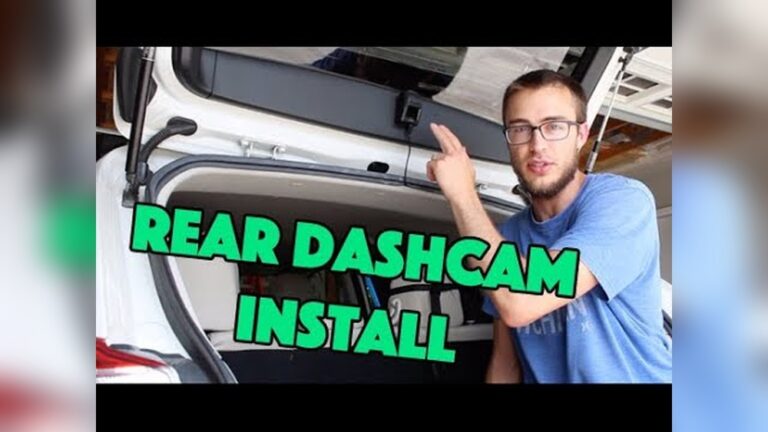
Many drivers count on a dash cam for security, clear accident evidence, and peace of mind. I do too. So nothing irritates me more than turning the car on and finding the dash cam won’t power up. You expect it to start automatically and protect you every time you drive. When it doesn’t, you risk missing critical footage.
This issue is more common than most people think. Dash cams are meant to be plug-and-play, but technical, electrical, and installation problems can stop them from turning on with your car. I’ve helped friends and readers diagnose these problems. With the right checks, most issues are fixable in minutes.
Below is a practical, step-by-step guide that explains why a dash cam might not turn on with the car, how to diagnose what’s wrong, and what to do next. I write in a clear, direct way so you can follow along even if you’re not an electrician. I’ll also share tools I use and show when to call a pro.
Common Reasons Dash Cam Does Not Turn On With Car
Dash cams should start when your car powers up. If yours doesn’t, one or more of the reasons below is usually to blame. I’ll list the common causes and add quick notes on how each one affects operation and what to check first.
1. Faulty Power Connection
The most frequent cause is a bad power connection. Dash cams normally draw power from the 12V cigarette lighter socket, a USB power port, the OBD port, or a hardwire kit to the fuse box. Any weak contact, corrosion, or cable damage can stop power flow.
- Loose plug: The plug might not sit tightly. Road vibration can make it disconnect.
- Damaged cable: Cables bend and pinch. A frayed wire often causes intermittent power.
- Corroded socket: Dirt or rust in the socket blocks good contact.
What I do first: wiggle the plug gently and watch the dash cam for flicker. If it flickers, replace the cable or clean the socket.
2. Blown Fuse
Cars protect circuits with fuses. If the fuse for the cigarette lighter outlet or the hardwire kit blows, the dash cam gets no power. Fuses fail from short circuits, surges, or old age.
Quick check: inspect the fuse visually or use a fuse tester. Replace it with the same rating if it’s blown. Never use a higher-rated fuse — it’s risky.
3. Dead Or Weak Car Battery
Dash cams rely on the car battery. A weak or nearly dead battery may not supply enough voltage to boot the dash cam. Many dash cams need a minimum voltage to start.
- Modern cars with smart battery management can cut accessory power if the battery voltage drops.
If your car struggles to start, test the battery with a multimeter or have it checked at a shop.
4. Dash Cam Internal Fault
Sometimes the problem is inside the dash cam. I’ve seen these failures on many models:
- Firmware corruption: A bad update or glitch can stop the unit from booting.
- Internal battery or capacitor failure: A tiny internal cell or capacitor preserves settings and helps boot. If it fails, startup can fail.
- Component failure: Power regulator, memory chip, or circuit-board damage can make the device dead.
If you suspect an internal fault, test the dash cam in a different car or with a known-good power adapter first. If it still won’t power up, contact the manufacturer.
5. Car Ignition And Accessory Mode Settings
Cars have modes: off, accessory, and on. Where you tap power matters. If your dash cam is wired to an accessory-only circuit, it will only power up when the key is in accessory or on. Some cars also delay accessory power for a few seconds.
Tip: wait a few seconds after turning the key. If the cam still doesn’t boot, your tap point may be wrong.
6. Incorrect Installation
Poor wiring or a sloppy install can cause no startup. Common mistakes are:
- Wrong fuse tap: Tapping a circuit that never gets switched power.
- Bad ground: Ground must be a clean bare metal connection — paint or plastic blocks it.
- Using a non-compatible adapter: Not all adapters or hardwire kits match every dash cam or car socket.
7. Low-quality Or Incompatible Dash Cam
Cheap dash cams can have poor power-handling or weak internal parts. Some models need more current than a car outlet or USB port can provide. Others may be sensitive to voltage dips during engine start.
Buying a reputable brand (Viofo, BlackVue, Thinkware, Nextbase, Garmin) and matching power specs avoids many headaches.
8. Overheated Dash Cam
Heat can prevent the dash cam from turning on. Many units have thermal protection and will refuse to boot until they cool. Direct sun on the windshield in hot climates is a common trigger.
If the cam feels hot, move it to shade and let it cool 30–60 minutes before trying again.
9. Software Conflicts
Less common, but it happens: Some dash cams conflict with other car electronics like aftermarket radios, GPS units, or OBD-II devices. Firmware bugs can also cause startup loops or freezes.
10. Physical Damage
Drops, moisture, and impact can break internal parts. Water damage may leave corrosion. If the device smells burnt, don’t keep powering it — get it serviced.
Diagnosing Dash Cam Power Issues
Find the root cause with a simple, logical process. I use the steps below in the order shown. They take time but eliminate guesswork.
Step 1: Check The Power Source
- Plug a known working device (phone charger, GPS) into the same outlet. If it powers on, the outlet is OK.
- If the outlet doesn’t work, suspect the socket, fuse, or car wiring.
Step 2: Inspect The Dash Cam Cable And Plug
- Look for frayed wires, bent pins, or cracked plastic.
- Wiggle the cable while it’s plugged in. If the dash cam flickers, the cable or plug is faulty.
Step 3: Test The Dash Cam In Another Car
- Plug the dash cam into another vehicle’s power outlet if you can.
- If it powers up there, the dash cam likely works and the issue is in your car’s power circuit.
Step 4: Check Car Fuses
- Locate the fuse box (dashboard, glovebox, or under the hood).
- Find the fuse for the cigarette lighter or accessory outlet.
- Use a fuse tester or pull the fuse and inspect the metal strip for breaks.
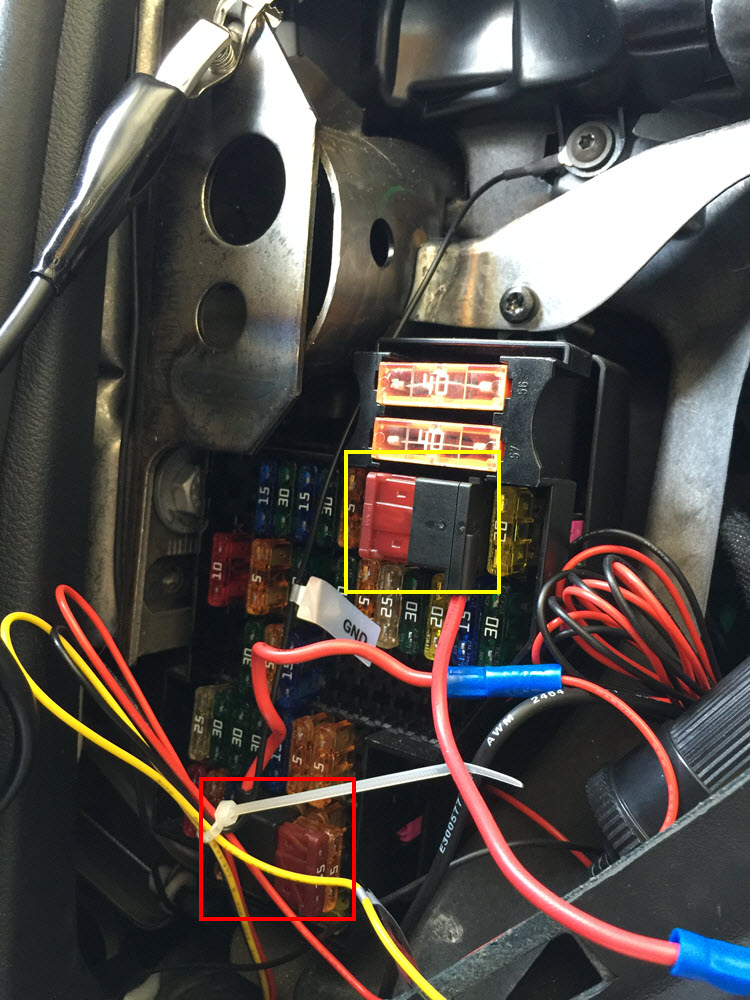
Step 5: Examine Hardwire Kit Installation
- If you use a hardwire kit, check these:
- Is the fuse tap on a circuit that gets power when the car turns on?
- Is the ground wire secured to metal (bare, not painted)?
- Check the kit’s inline fuse for damage or wrong rating.
Step 6: Try Different Power Adapters
- Use a different compatible power adapter to rule out adapter failure. Use a quality adapter that matches the dash cam’s voltage and current specs.
Step 7: Reset The Dash Cam
- Many units have a reset pinhole or button — hold it for 10 seconds.
- Remove the memory card and try powering up. A corrupted SD card can block booting.
Step 8: Check For Overheating
- Move the car into shade and let the camera cool for 30–60 minutes. Thermal protection may be preventing start.
Step 9: Inspect For Physical Damage
- Look for cracks, water stains, dents, or a burnt smell. Any of these suggest internal damage.
Step 10: Review Car Battery Health
- If your car struggles to start or accessories don’t work, test battery voltage with a multimeter.

Credit: www.reddit.com
How Car Power Systems Affect Dash Cam Operation
Knowing how your car’s power system works helps explain dash cam behavior. I break it down into common power options:
| Power Source | When Active | Dash Cam Behavior |
|---|---|---|
| Cigarette Lighter Socket | Accessory/On | Dash cam turns on with car |
| Hardwired to Fuse Box | Accessory/On/Parking mode (depends on circuit) | Dash cam may turn on in parking mode if wired for constant power |
| OBD Port | Accessory/On | Dash cam turns on with car, may access vehicle data |
Key points from my experience:
- Some cars cut outlet power when the engine is off. That stops dash cams unless hardwired to a constant source for parking mode.
- Hardwire behavior depends on the chosen fuse: Constant power gives parking recording but risks battery drain. Accessory power limits the cam to when the car is on.
If a dash cam is hardwired to a circuit that is dead at startup, it will not turn on automatically. Use a voltmeter to check whether a chosen fuse slot is powered in the mode you want.
Hardwire Kits: Installation And Mistakes
Hardwiring gives a clean look and enables parking mode recording. But installers often make mistakes. Here’s how a hardwire kit should work and where people go wrong.
- The kit usually includes a fuse tap for power, a ground wire, and sometimes a trigger wire for parking mode.
- Choose the right fuse:
- Accessory fuse if you want the cam only when the car is on.
- Constant fuse if you want parking mode recording.
- Ground must be bare metal (not painted or plastic).
If the fuse tap is wrong or the ground is poor, the dash cam may not turn on, flicker, or might drain the battery.
Common Installation Mistakes
- Wrong fuse selection: Tapping into circuits that only power certain systems or are switched off at startup.
- Poor ground: Attaching ground to painted metal blocks the connection.
- Loose connections: Fuse tap or ground not fully secured.
- Incompatible kits: Using a kit that doesn’t fit your car’s fuse type (mini, micro, blade).
- Skipping the inline fuse: That inline fuse protects both the dash cam and vehicle wiring.
Dash Cam Power Consumption And Car Battery
Dash cams use little power, but runtime and battery condition matter. Here are useful numbers I use when planning a hardwire install or parking mode setup.
- Typical dash cam draw: 0.5–1.5 amps (6–18 watts)
- Car battery capacity: 45–75 amp-hours (Ah)
A weak battery can be drained by hours of parking-mode recording. Most dash cams include a voltage cutoff feature to protect the battery. If that feature fails, the cam may not turn on or could drain the battery too far.
| Dash Cam Power Draw | Battery Capacity (Amp-hours) | Estimated Runtime (hours) |
|---|---|---|
| 0.5 amps | 50 | 100 |
| 1.5 amps | 50 | 33 |
| 1.0 amps | 70 | 70 |
Dash Cam Models And Compatibility
Not every dash cam fits every car. Below are examples of common models, their power needs, and compatibility notes I rely on when recommending hardware.
| Dash Cam Model | Power Requirement | Compatible With | Notes |
|---|---|---|---|
| Viofo A129 | 5V/2A (via USB) | Most cars, hardwire kits available | Parking mode requires hardwire kit |
| BlackVue DR900X | 12V/1.5A | 12V socket, hardwire, OBD | High power draw, needs good battery |
| Garmin Dash Cam Mini | 5V/1A (micro USB) | All cars with USB adapter | Low power, easy plug-and-play |
Some dash cams are sensitive to voltage dips during engine cranking. Use a high-quality adapter or a hardwire kit with voltage stabilization to reduce start-up failures.

Credit: www.reddit.com
Practical Solutions For Dash Cam Power Problems
You want the dash cam to work every time you start the car. These fixes are practical and safe. I’ve used each of them and recommend the order shown.
Replace Or Repair Power Connections
- Replace damaged plug or cable with an OEM or manufacturer-approved spare.
- Clean the socket with electrical contact cleaner and a soft brush to remove corrosion or debris.
Change Fuses
- Replace blown fuses using the exact same amp rating.
- Never substitute a higher-rated fuse — that can cause wiring to overheat.
Improve Hardwire Installation
- Re-check the fuse tap and choose a circuit that delivers power in the car mode you want (accessory vs constant).
- Reconnect ground to clean bare metal and tighten securely.
- Use the inline fuse from the kit. It protects both the dash cam and vehicle wiring.
Upgrade Your Car Battery
- If your battery is old or weak, replace it. A fresh battery reduces startup voltage dips and supports parking mode.
- Consider higher amp-hour or a deep-cycle battery if you use parking mode heavily.
Reset Or Update Dash Cam Firmware
- Check the manufacturer’s site for firmware updates and release notes before updating.
- Follow update steps carefully and keep power stable during the process to avoid corruption.
Avoid Overheating
- Use sunshades or park in the shade to reduce cabin heat.
- Remove the dash cam if you will park in extreme heat for many hours.
Use Compatible Dash Cams And Adapters
- Check your car manual for outlet specs and match the dash cam’s power requirements.
- Use a branded adapter or a high-quality third-party adapter rated for the cam’s current draw.
Check For Electrical Conflicts
- If multiple accessories are attached, unplug them one by one. Some aftermarket radios, GPS units, or OBD devices can cause interference.
Inspect For Physical Damage
- If the dash cam got wet or was dropped, contact manufacturer support for repair or replacement.
Non-obvious Insights And Tips
These are things many people miss. I include them because they save time and prevent repeat issues.
- Fuse placement matters: Even within one fuse box, certain slots are only live in specific car states. Use a voltmeter first to confirm.
- Voltage dips at startup: When cranking, voltage can momentarily fall below 12V. Some dash cams won’t start during that dip. A stable power adapter or a buffer circuit helps.
- Accessory delay: Many cars delay power to accessories. Wait a few seconds after turning the key before judging whether the dash cam turns on.
- SD card issues: A corrupted or slow SD card can prevent boot. Use manufacturer-recommended cards and format them in the camera.
- OBD vs cigarette port: OBD ports can provide constant or switched power depending on vehicle. Check behavior before hardwiring.
Preventing Dash Cam Power Issues
Prevention lowers hassle. Here’s a checklist I use when installing or troubleshooting a dash cam to keep it reliable.
- Inspect cables and plugs every few months.
- Check fuse health and socket connections regularly.
- Use a voltmeter when installing a hardwire kit to confirm the correct circuit.
- Update firmware periodically and back up settings before updates.
- Avoid leaving the dash cam in extreme heat or cold for long periods.
- Choose quality adapters and avoid cheap, off-brand power supplies.
- If your car battery is old, replace it before enabling continuous parking mode.
Dash Cam Troubleshooting Checklist
If the dash cam does not turn on with your car, follow this step-by-step checklist. I use this exact list when helping others.
- Test the power outlet with another device.
- Inspect dash cam power cable and plug.
- Try the dash cam in another vehicle.
- Check car fuses and replace if necessary.
- Examine hardwire kit installation and ground connection.
- Use a different power adapter to rule out adapter failure.
- Reset the dash cam and remove memory card.
- Allow dash cam to cool if it feels hot.
- Inspect for physical damage.
- Test car battery voltage with a multimeter.
When To Seek Professional Help
If you’ve tried the troubleshooting steps and the dash cam still won’t power on, it’s time to call a professional. An auto electrician or an experienced dash cam installer can:
- Diagnose electrical faults in the car.
- Test dash cam hardware with the right tools.
- Repair or replace damaged parts safely.
- Reinstall hardwire kits correctly and test for battery drain.
Don’t risk your vehicle’s electrical system by guessing. Professionals have the tools (fuse pullers, voltmeters, multimeters, circuit testers) and experience to fix complex issues safely.
The Importance Of Reliable Dash Cam Operation
A dash cam that won’t turn on is more than an annoyance. It’s a safety gap. Dash cams record accidents, hit-and-runs, thefts, and road incidents. Missing footage can hurt insurance claims and legal disputes.
By understanding how dash cams interact with your car’s power system, doing the right checks, and applying the practical fixes above, you can keep your dash cam reliable. I suggest keeping a simple toolkit (spare fuse, spare cable, voltmeter) in the glovebox. It saves time and gives peace of mind.
Credit: dashcamtalk.com
FAQs About Why Does Dash Cam Not Turn on With Car
Why Does My Dash Cam Only Turn On Sometimes With My Car?
This usually points to a loose power connection, a weak battery, or a fuse that’s starting to fail. Also remember some cars delay accessory power by a few seconds — wait a moment after turning the key.
Can A Dash Cam Drain My Car Battery?
Yes. A hardwired dash cam in parking mode can drain a weak battery over many hours. Most dash cams have a voltage cutoff to prevent this. If your battery is old or the cutoff isn’t working correctly, battery drain is possible.
Is It Safe To Install A Hardwire Kit Myself?
You can install a hardwire kit yourself if you follow instructions carefully and use a voltmeter to test circuits. Always use the kit’s inline fuse and ground to bare metal. If you’re unsure at any step, get a professional to avoid damage.
Why Does My Dash Cam Turn Off When I Start My Car?
Startup causes a temporary voltage dip. Some dash cams are sensitive and will shut down during the dip, then reboot when voltage recovers. Using a higher-quality adapter or a hardwire kit with voltage stabilization reduces this behavior.
What Should I Do If My Dash Cam Overheats And Won’t Turn On?
Move the vehicle to shade and let the dash cam cool for 30–60 minutes. Avoid leaving it in direct sunlight. If it still won’t power up after cooling, check for internal damage and contact the manufacturer’s support.
If you want to learn more about dash cams and their installation, visit Consumer Reports for expert reviews and guides.
Keeping your dash cam working every time you drive is possible with careful installation, the right tools, routine checks, and understanding your car’s power system. Follow the checklist, keep spares on hand, and don’t hesitate to call a qualified auto electrician when needed your footage and peace of mind are worth it.

I am Julian Drive, an automotive enthusiast and repair expert with over 7 years of hands-on experience in vehicle maintenance. At Carora Hub, I simplify complex car issues into easy-to-follow DIY guides to help drivers stay safe and save on repair costs.