Skip the dealer fees for a five-minute job. Knowing how to change Toyota Prius key fob battery yourself keeps your hybrid usable and your maintenance budget focused on what matters most.
Don’t worry—replacing your key fob battery is easier than it looks. In this guide I walk you through clear, safe steps to get your key fob working again fast. Follow along and you’ll save time and avoid an unnecessary trip to the dealer.
Your Prius—and your peace of mind—will thank you.
Tools Needed
Changing the battery in a Toyota Prius key fob is quick. A few simple tools make it safer and faster. I keep these items in my glovebox or toolbox so I’m always ready.
Small Flathead Screwdriver
A small flathead screwdriver or a thin pry tool helps open the case without damage. Use gentle pressure. A thin tip avoids scratching the plastic.
Replacement Battery
Most Prius key fobs use a CR2032 coin cell battery. Always check your old battery to confirm the code before buying. I buy name-brand CR2032s for reliable voltage and longer life.
Soft Cloth Or Mat
Work on a soft cloth or small mat. This protects the fob from scratches and keeps tiny parts from rolling away.
Tweezers (optional)
Tweezers are handy for lifting the old battery from the tight slot. They give better control than fingers but are optional.
Common Prius Key Fob Models and Battery Types
Different Prius model years and trims may use similar but slightly different fob shells. Most Toyota smart keys (Prius, Prius Prime, Prius c) use CR2032 cells. A few older remotes might use CR2016. Check the battery label or your owner’s manual to be sure.
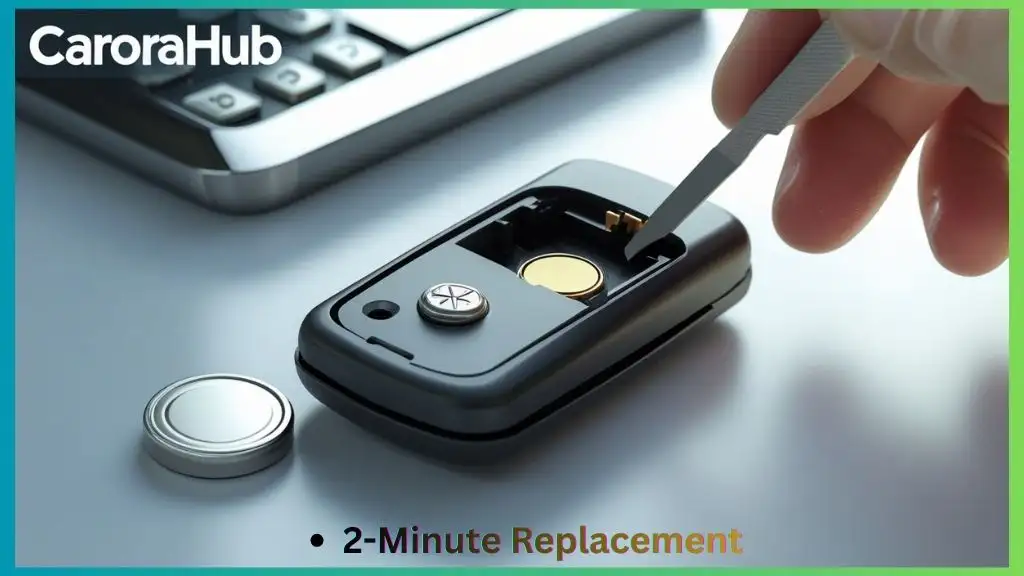
Locate The Key Fob Release
First, find the small release or notch on your Prius key fob. Press it or slide it to pop the mechanical key out and to reveal the seam. This gives you safe access to the battery compartment.
Most fobs have a tiny indentation or slider on the side or back. Look closely so you don’t force anything. Press or slide gently—rushing can crack the plastic or dislodge small internal parts.
Identify The Release Type
Toyota uses a couple of release styles. Some fobs have a push-button release for the emergency blade. Others use a small sliding latch. Knowing which yours uses makes opening easier and reduces risk of damage.
Use Proper Tools If Needed
If the release is tight, use a coin or a small flathead screwdriver. Apply steady, controlled pressure. Avoid sharp tools that could gouge the plastic.
If you’re optimizing daily efficiency, also read Impact of Ac on Prius Fuel Economy to avoid hidden MPG losses.
Open The Key Fob
Opening the key fob is straightforward. Take it slow. This protects the internal circuit board, rubber buttons, and battery contacts.
Find The Seam On The Key Fob
Look for a thin seam where the two halves meet. The seam runs around the edge of the fob. That’s where you’ll insert your tool.
Use A Small Flat Tool
Insert a thin flathead screwdriver or a coin into the seam. Twist gently to create a small gap. If you feel resistance, reposition and try again. The goal is to separate the clips, not to pry the plastic apart aggressively.
Separate The Two Halves
Once the clips release, pull the halves apart with your fingers. Keep the fob on a flat, soft surface so nothing falls out. Note how the rubber keypad and circuit board sit before moving anything.
Safety Precautions When Opening
Avoid touching the circuit board contacts. Static or oils from your fingers can affect performance. Work in a clean, dry area. Keep small parts and batteries away from children and pets.
After opening, you’ll see the battery. Take a picture or make a quick note of the battery orientation. That prevents wrong installation later.
Remove The Old Battery
With the fob open, remove the old battery carefully. A clean, gentle approach protects the spring clips and contact pads.
Open The Key Fob Case
Locate the battery pocket inside the case. If a small cover holds the cell, lift it using the flat tool. Apply minimal force so you don’t bend the metal contacts.
Take Out The Old Battery
Note which side is up before you remove the battery. Use your finger or tweezers to lift it out. If the battery seems stuck, gently push it toward the spring clip and lift out from the opposite side.
Dispose Of The Old Battery Properly
Don’t toss coin cells in the trash. They contain lithium and should be recycled. I drop old batteries at electronics stores or community recycling centers. Many retailers accept used batteries for safe disposal.
Handling and Safety Tips
- Keep used batteries away from children and pets.
- Place old batteries in a small, sealed container until recycling.
- If a battery looks corroded or swollen, handle with gloves and avoid skin contact.
Insert The New Battery
Put the new battery in the slot the same way the old one was oriented. A correct fit restores reliable keyless entry and remote functions.
Prepare The New Battery
Remove the new CR2032 from its packaging. Confirm the part number. Handle the cell with clean fingers or tweezers. Avoid touching both sides of the battery to reduce oil transfer.
Place The Battery In The Slot
Insert the battery with the positive (+) side facing up, unless your fob specifies otherwise. Press it gently into the contact until it sits snugly. Don’t force it—alignment should be smooth.
Secure The Battery Cover
Put the cover or internal clip back in place. Make sure the metal contacts press lightly on the battery. A loose connection causes intermittent performance.
Read More: Key Fob Battery Replacement Toyota Sienna
Reassemble The Key Fob
Reassembly is the final hands-on step. Align the pieces and snap them back together carefully. Then test everything before you walk away.
Press the battery cover back down. Make sure it locks. The click tells you it’s secure.
Check each button. They should press and release cleanly. If buttons stick, reopen and check for displaced rubber pads or misaligned components.
Stand by your car and press lock and unlock to confirm range and response. If the car does not respond, open the fob and double-check the battery placement and contact surfaces.
Align The Key Fob Halves
Match edges carefully. Snap the halves together evenly. Don’t force any corner—if they don’t align, something is out of place inside.
Secure The Battery Cover
Press around the edges of the back cover. You should hear a soft click. Run your finger along the seam to ensure a full seal.
Check Button Functionality
Press each button several times. They should move freely and spring back. If they don’t, the rubber keypad may be misaligned. Reopen the fob and reposition parts if needed.
Test The Key Fob
After reassembly, test every function. Confirm lock, unlock, panic, and any remote start feature work at normal range. Testing now avoids surprises later.
Check The Lock And Unlock Buttons
Stand near the car and press lock once. The lights or horn should confirm the lock. Press unlock to verify doors open. If nothing happens, recheck battery orientation and contacts.
Try The Panic Button
Hold the panic button for a few seconds. The alarm should sound. This confirms a strong radio signal and good battery health.
Test The Remote Start (if Available)
If your Prius has remote start through the fob, test this function. If it fails while the remote works for lock/unlock, the issue may be a fob programming or vehicle setting, not the battery.
Use A Spare Key Fob
If you have a spare fob, test it too. If both fobs do not work, the car’s receiver or fuse may be the problem. If the spare works, focus on the rebuilt fob’s assembly and battery contacts.

Credit: www.postoaktoyota.com
Tips For Battery Maintenance
Simple habits extend your key fob battery life and prevent surprises. I follow these tips to keep remotes working between changes.
Regular checks and small habits make a big difference. Here are practical steps that helped me avoid mid-trip lockouts.
Store Your Key Fob Properly
Avoid leaving the fob in hot cars or on direct sunlight. Heat speeds battery drain. Keep it in a cool, dry place whenever possible.
Clean The Battery Contacts
Clean contacts with a dry cotton swab or a little isopropyl alcohol on a Q-tip if they look dirty. Make sure contacts are dry before inserting a new battery. Dirty contacts reduce signal strength.
Use The Key Fob Regularly
Using the fob often keeps the battery active. Letting it sit unused for long periods can mean a dead battery when you need it most.
Replace Battery At Signs Of Weakness
Replace the battery if range drops, you need to get closer to the car, or functions slow down. I usually swap mine every 2–3 years or at the first sign of weakness.
Where to Buy Batteries and Recycling Options
Buy CR2032 batteries at auto parts stores, big-box retailers, or reputable online sellers. For recycling, many electronics stores, municipal centers, and battery retailers accept used coin cells.
Final Verdict
Changing your Toyota Prius key fob battery is fast, low-cost, and something most owners can do at home. Follow the steps here and you’ll avoid dealer fees and prevent stressful lockouts. Keep a spare CR2032 in your kit for quick swaps.
Routine care—correct storage, occasional contact cleaning, and timely replacement—keeps your key fob reliable. Now you’re ready to change the battery whenever it’s needed. No dealer visit required.
Read More: How to Maintain a Toyota Prius Hybrid Battery
FAQs Of Change Toyota Prius Key Fob Battery
How Do I Open A Toyota Prius Key Fob?
To open a Toyota Prius key fob, locate the small notch or release on the side. Use a flat tool or a coin to gently pry it open. Be careful not to damage the casing or internal parts during the process. Take a photo of the layout if you’re unsure about reassembly.
What Type Of Battery Does A Prius Key Fob Use?
A Toyota Prius key fob typically uses a CR2032 lithium coin battery. This battery is common and easy to replace. A few older or rare fob versions may use CR2016—check the old battery or your owner’s manual to confirm the right type.
How Often Should I Change The Prius Key Fob Battery?
Change the Prius key fob battery every 2 to 3 years or when the signal weakens. Signs include reduced range or delayed responses. Replace the cell promptly to avoid lockouts or failed remote starts.
Can I Replace The Prius Key Fob Battery Myself?
Yes. You can replace the Prius key fob battery yourself with basic tools and careful handling. Follow the steps in this guide: open the fob, remove the old coin cell, insert the new battery with correct orientation, reassemble, and test. If you’re not comfortable or the fob is damaged, a dealer or locksmith can help.
Troubleshooting: If the Fob Still Doesn’t Work
- If buttons work but the car doesn’t respond, try standing closer to the vehicle. Interference or dead vehicle receiver (rare) can block the signal.
- If nothing changes after a fresh battery, re-open the fob and make sure the battery contacts touch firmly. Clean any corrosion on the contacts with isopropyl alcohol.
- If the fob still fails and your spare fob works, the problem is likely the rebuilt fob’s internal hardware. If both fobs fail, check vehicle fuses and consult a dealer or auto locksmith.
- When in doubt, document the fob’s appearance and bring it to a trusted shop for diagnosis.
If you want, tell me your Prius model year and I’ll note any model-specific tips for your key fob type.

Hello, I’m Norman. I work as a car researcher. I am the voice behind CaroraHub. I have over 15 years of experience. I give simple and useful car advice. I help with car care, cleaning, and small repairs. My goal is to help you keep your car healthy. I want car care to be easy and cheap for you. You can trust my tips to keep your car working well for a long time.