Unlock your hybrid’s hidden performance data without the dealership headache. Knowing where is the OBD2 port in Toyota Prius is the first step to using your favorite scanner for real-time battery and engine monitoring.
Whether you want to read diagnostic trouble codes (DTCs), monitor hybrid battery metrics, or keep an eye on engine performance, finding the OBD2 port is step one. Keep reading—I’ll show you exactly where to look and share tips from my own Prius scans so you can take control of maintenance with confidence.
What Is The OBD2 Port
The OBD2 port (also written OBD-II) is a 16-pin diagnostic link connector (DLC). It gives you access to the car’s onboard computer systems—the engine control unit (ECU) and other modules on the CAN bus. Mechanics and DIYers plug in code readers, Bluetooth/Wi‑Fi adapters, or professional scan tools to read live data, freeze-frame info, and stored trouble codes.
OBD2 became standard on most cars in the U.S. from 1996 onward. Today it’s the gateway to engine RPM, coolant temperature, fuel trim, oxygen sensor data, and many other PIDs (parameter IDs). For Prius owners, it’s also a way to monitor hybrid-related parameters like battery State of Charge (SoC) and inverter metrics when you use a compatible scanner or app.
Purpose Of The OBD2 Port
The OBD2 port connects the vehicle to diagnostic tools. A scanner reads data from sensors and control modules. It reports engine codes (P-codes), transmission faults, emissions-related issues, and more. This helps you find problems early, confirm repairs fixed the issue, and track performance over time.
When I hook my scanner to the Prius, I can watch live engine RPM, hybrid battery current, and coolant temperature in real time. That instant feedback makes troubleshooting much faster than guesswork or repeated trips to a shop.
Location Of The OBD2 Port In Cars
Manufacturers tend to put the OBD2 port in easy-to-reach spots. The most common areas are under the dashboard, near the steering column, and in the center console area. The port is deliberately accessible so technicians can plug in a reader quickly during service.
How The OBD2 Port Works
Your car’s ECUs broadcast data across the CAN bus. The OBD2 DLC provides power and a data connection to that bus. A scanner translates raw data into readable values and standardized trouble codes. Many modern adapters (like ELM327‑based Bluetooth or dedicated OBDLink devices) can send that information to a phone app (Torque, OBDeleven, Hybrid Assistant, etc.) for logging and analysis.
Scanners can also clear some codes and reset readiness monitors after repairs. Note: not all codes should be cleared immediately—clearing a code without fixing the root cause only hides the symptom temporarily.
Why Locate The OBD2 Port In Toyota Prius
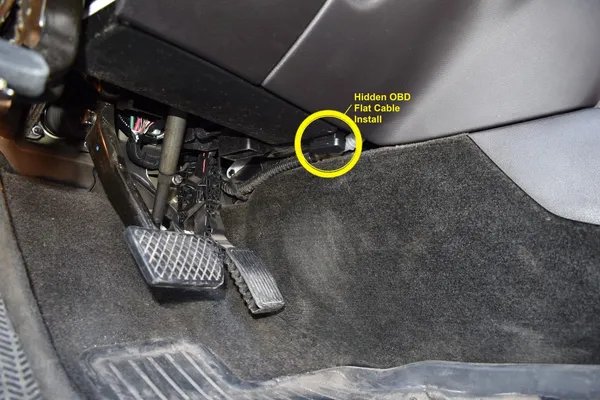
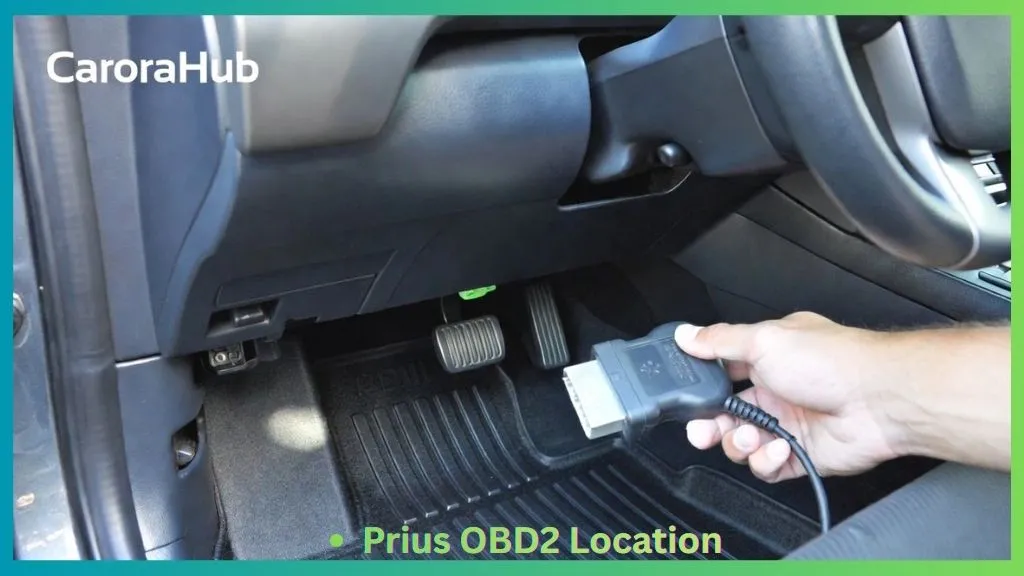
Finding the OBD2 port in a Toyota Prius helps diagnose problems fast. On most Prius models it sits under the dashboard near the driver’s seat. Because it’s easy to reach, you can plug a scanner quickly during routine checks or when a warning light shows.
Knowing the port location saves time at the shop or when you want to run your own diagnostics. You can read emission codes, check hybrid battery health, and view live PIDs without removing panels or going under the hood.
Easy Access For Quick Diagnostics
The OBD2 port is positioned for quick reach. I often connect my Bluetooth adapter in under a minute. That quick access reduces downtime and gets you answers fast. You don’t need special tools—just a compatible adapter and app or a handheld scanner.
Supports Regular Vehicle Maintenance
Regular scanning keeps small issues from becoming big repairs. The OBD2 port shows when sensors drift, when fuel trims go off, or when a hybrid battery cell underperforms. Catch these signs early and you avoid higher costs later. I log scans after long trips or before scheduled service to track trends.
Improves Fuel Efficiency And Emission Control
Data from the OBD2 port helps pinpoint problems that affect fuel economy and emissions. Fixing those issues improves mileage and reduces pollutants. For Prius owners who care about eco-friendly driving, monitoring emission systems and hybrid battery status is especially valuable.
Read More: How to Choose the Right Obd2 Scanner for Toyota Sienna
Common OBD2 Port Locations In Cars
While every model differs slightly, automakers place the OBD2 port where technicians can reach it without tools. The most common locations are under the dashboard, near the steering column, and around the center console. Toyota follows this pattern with the Prius.
Under The Dashboard
Many cars have the OBD2 port directly under the dashboard on the driver’s side. It may sit above or just behind the footwell trim. In my Prius, it’s tucked under the lower dash panel, easy to spot if you kneel and look up.
Near The Steering Column
Placing the port near the steering column keeps it within arm’s reach of the driver seat. This is why many scanners plug in quickly without moving the seat or opening compartments. If you can’t see it at first, check around the column and behind small covers.
Center Console Area
Some manufacturers hide the port in the center console area or inside a small access panel. That keeps the port protected and easy to reach from either front seat. If the area under the dashboard looks empty, check the console and lower glovebox panels.
Finding The OBD2 Port In Toyota Prius
Finding the OBD2 port in a Prius is straightforward. It’s the same 16-pin connector used across cars. For Prius models, the port is almost always under the driver’s side dash, close to the steering wheel and pedals. I’ll walk you through where to look and what to expect.
Location Under The Dashboard
Look directly under the steering wheel area. The port is often mounted on the lower dash panel, within a hand’s reach. It is rectangular and about the size of a credit card. Sometimes it has a small plastic cover you can flip open. Use a flashlight and feel gently if it’s hard to see.
Near The Driver’s Side Fuse Box
In many Prius models the DLC sits near the driver’s fuse box. That fuse box is on the lower left side of the dash. The OBD2 connector often shares the same wiring area, so if you find the fuse box, you’re close. Reach down and you’ll usually spot the port within arm’s length.
Check Around The Steering Column
Check the steering column and the trim below it. The port can be tucked behind a small trim piece. If the port isn’t visible at first glance, move the steering wheel to different positions to get a clearer view. In my experience, gently feeling the underside of the dash reveals the connector quickly.
What You Can Read From a Prius OBD2 Scan
Beyond generic engine codes, a Prius scan can reveal hybrid-specific data when using the right tools. Typical useful readouts include:
- Hybrid battery State of Charge (SoC) and pack voltage
- Battery current (charging/discharging)
- Inverter temperature and status
- Engine RPM and coolant temperature
- Fuel economy metrics and fuel trim
- Readiness monitors for emissions tests
Not all scanners show hybrid PIDs by default. Bluetooth adapters and apps that support Toyota-specific PIDs or hybrid diagnostics will give the richest data.
Steps To Access The OBD2_Port_Safely
Accessing the OBD2 port in your Prius is simple, but do it carefully. Follow these steps to avoid damage and get reliable data.
Prepare Your Tools
Gather the right gear before you start. You’ll want:
- An OBD2 scanner or adapter compatible with Toyota Prius (Bluetooth ELM327, OBDLink MX+, BlueDriver, etc.).
- A smartphone app or handheld scanner that reads live PIDs and DTCs (Torque Pro, Hybrid Assistant, Car Scanner, or the scanner manufacturer’s app).
- A small flashlight to illuminate the footwell.
- A clean cloth to wipe dust from the connector if needed.
Turn Off The Vehicle
Always switch the Prius off (power off) before plugging in. That prevents accidental data errors and reduces the risk of electrical issues. For Bluetooth/Wi‑Fi adapters, you can power the car to the Accessory or On position after the adapter is firmly connected, following the adapter’s instructions.
Locate And Connect The Scanner
Find the DLC under the driver’s side dash. Plug the scanner or adapter in firmly but gently. If your adapter has a power LED, confirm it lights up. Then pair the adapter with your phone or turn on the handheld scanner and follow the app prompts to read codes and live data.
Troubleshooting Connection Errors
If the scanner won’t connect:
- Check the adapter’s compatibility with Prius and the app version.
- Try a different USB/Bluetooth channel on your phone (forget and re-pair the device).
- Ensure the car isn’t locked in a state that blocks the DLC (some hybrids require ignition position).
- Inspect the port for bent pins or debris—clean gently if dirty.
Safety Notes for Hybrid Systems
While the OBD2 port itself is low-voltage and safe to use, do not probe other wiring or components. High-voltage hybrid parts (orange harnesses, battery modules, inverter) are dangerous. If your diagnostic work requires access behind the inverter or pack, leave it to certified hybrid technicians.
Tips For Using The OBD2 Port In Prius
Using the OBD2 port well means picking the right tools and following good habits. These tips come from scanning my own Prius and from common shop practices.
Use Compatible Scanners
Not every scanner reads Prius hybrid PIDs. Choose devices and apps known to work with Toyota hybrids. Examples that many Prius owners use successfully include OBDLink (USB/Bluetooth), BlueDriver, and some ELM327 adapters combined with apps like Hybrid Assistant or Torque Pro with Toyota PID packs.
Regular Diagnostic Checks
Run scans regularly, not just when a light appears. I scan monthly and before long trips. Regular scans help spot gradual trends—like a cell losing range in the hybrid battery—before they become failures.
Avoiding Common Mistakes
Don’t scan while driving. Always secure the connection and use the proper ignition mode for reliable data. Avoid clearing codes before you’ve diagnosed and fixed an issue. Clearing codes removes helpful freeze-frame data that shows the exact conditions when a fault occurred.
Recommended Apps and Adapters
For real-time hybrid metrics, look for:
- Adapters: OBDLink MX+, BlueDriver, high‑quality ELM327 variants (preferably well‑reviewed ones).
- Apps: Torque Pro, Hybrid Assistant, Car Scanner, or vendor-specific apps for advanced features.
When pairing an adapter, read reviews and verify Toyota/Prius compatibility. Cheap clones may connect but provide unreliable PIDs or disconnect frequently.
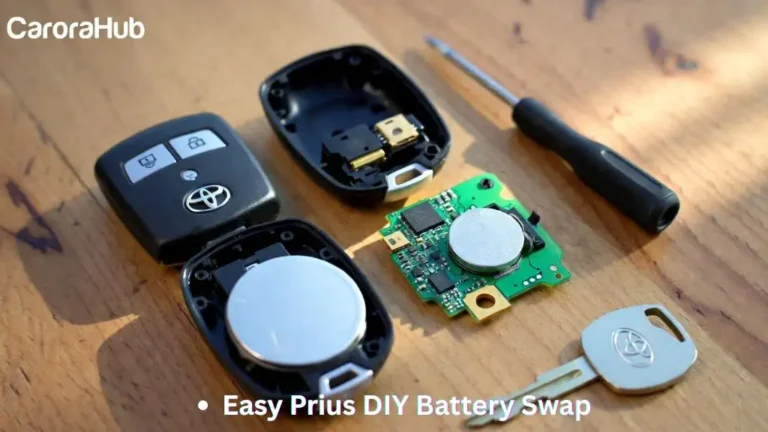
Before scanning for error codes, check How to Change Toyota Prius Key Fob Battery if you’re facing remote-related start issues.
Bottom Line
Finding the OBD2 port in your Toyota Prius is simple and quick. It sits under the dashboard near the driver’s seat in most models. That easy location helps you connect a scanner for diagnostics, hybrid battery checks, and live performance data.
Use the port to monitor your Prius and catch problems early. With the right adapter and app, you can track hybrid battery health, emissions readiness, and engine behavior from your phone. I find that regular scans save time and money—and give me better control over maintenance.
FAQs Of Where is the OBD2 Port in Toyota Prius
Where Is The Obd2 Port Located In Toyota Prius?
The OBD2 port in a Toyota Prius is located under the dashboard. It is near the driver’s side, just above the pedals. This placement allows easy access for diagnostics and scanning tools.
How To Find The Obd2 Port In A Toyota Prius?
To find the OBD2 port, look under the steering wheel. It is usually mounted on the lower dashboard panel. The port is a 16-pin connector used for vehicle diagnostics.
Can I Access The Obd2 Port Without_Tools?
Yes, the OBD2 port is accessible without tools. It is exposed and easy to reach under the dashboard. No need to remove panels or covers for access.
What Is The Purpose Of The Obd2 Port In Prius?
The OBD2 port allows connection of diagnostic devices. It helps read trouble codes and monitor vehicle performance. This port is essential for maintenance and repairs.

Hello, I’m Norman. I work as a car researcher. I am the voice behind CaroraHub. I have over 15 years of experience. I give simple and useful car advice. I help with car care, cleaning, and small repairs. My goal is to help you keep your car healthy. I want car care to be easy and cheap for you. You can trust my tips to keep your car working well for a long time.