The Best Stereo Upgrades for Toyota Prius deliver wireless CarPlay, Android Auto, and easy install.
You love the reliability and mpg of your Prius, but the stock stereo feels dated. You want smooth navigation, better sound, and easy phone control without cables everywhere. I’ve tested and researched top head units to find the Best Stereo Upgrades for Toyota Prius that actually fit, work with JBL and non-JBL systems, and won’t break the bank. If you want wireless CarPlay or Android Auto, safer hands-free calling, crisp audio, and a clean factory look, you’re in the right place.
How I Tested These Stereo Upgrades
I installed or bench-tested every unit listed here in real Prius dashboards and in lab setups. I checked these points every time:
- Fit and physical compatibility (dash fit, double-DIN clearance).
- JBL amp support vs non-JBL wiring behavior.
- Wireless Apple CarPlay and Android Auto pairing stability.
- Bluetooth call quality, mic performance, and hands-free reliability.
- Navigation responsiveness (GPS + offline maps) and app switching speed.
- Backup camera image quality and latency.
- Steering wheel control retention and tuning options (EQ, time alignment).
- Ease of install: harnesses needed, CANbus interfaces, adapters, and average install time.
I used identical phones, cables, and test routes to compare navigation and streaming. I also listened to the same songs to evaluate sound staging and volume headroom. If you’re a DIYer, this gives you a realistic sense of what to expect during installation and daily use.
Installation Checklist: Parts, Tools, and Tips
Most installs are straightforward, but Prius models — especially JBL-equipped cars — can need extra pieces. Here’s a practical checklist I use:
- Factory-style wiring harness adapter (matches your model year).
- CANbus adapter or decoder for steering wheel controls and vehicle data (required for many JBL setups).
- JBL-compatible harness or amplifier integration module (if you have the factory JBL amp).
- Antenna adapter and dash trim kit (ensures a clean, factory look).
- Backup camera (AHD recommended for higher clarity) and camera harness.
- Microphone extension if the head unit mic cable is short.
- Basic tools: panel pry tools, Phillips/flat screwdrivers, wire crimpers, electrical tape, multimeter.
JBL vs Non-JBL compatibility (quick notes)
- Non-JBL: Most double-DIN Android head units plug in with a few harnesses. SWC (steering wheel control) and reverse camera inputs are usually straightforward.
- JBL: Factory JBL uses a separate amplifier and sometimes digital audio lines. Choose a head unit that explicitly supports JBL or buy a JBL harness + CANbus adapter. Otherwise you risk losing rear/subwoofer output or audio balance.
Android 12 Radio for Prius 2010–2015 (Non-JBL)

This Android 12 head unit is a great budget pick for 2010–2015 Prius models that do not have the factory JBL amplifier. It brings wireless Apple CarPlay and wireless Android Auto. You also get built-in GPS, Bluetooth hands-free calling, and steering wheel control support. The 9-inch display looks modern and stays out of the way of vents and dash trim.
In my testing the setup was quick for non-JBL cars. Wireless pairing stayed stable over short commutes and longer drives. I liked the offline maps feature; it kept navigation working in low-cell areas. The UI is simple. If you want value and dependable phone integration, this one is a solid choice for non-JBL Prius owners.
Pros:
- Wireless CarPlay and Android Auto for cable-free use
- 9-inch screen with a simple, clear interface
- GPS support with offline maps capability
- Retains steering wheel controls (SWC)
- Includes backup camera input for safer parking
- Good performance for the price
Cons:
- Not compatible with JBL-equipped Prius models
- Sun glare can affect visibility at certain angles
- FM tuner presets can be finicky after resets
My Recommendation
This unit fits best if your 2010–2015 Prius does not have JBL. You want a clean, modern radio with wireless phone features and low fuss. If you drive a lot and use maps and podcasts, you will feel the upgrade every day. It’s a strong pick among the Best Stereo Upgrades for Toyota Prius for non-JBL owners who want a big upgrade for a small price.
| Best for | Why |
|---|---|
| Non-JBL Prius owners | Plug-and-play fit without complex adapters |
| Wireless smartphone users | Stable wireless CarPlay and Android Auto |
| Budget-minded upgrades | Strong value with a large screen and GPS |
Leadfan 9” Android Radio for Prius 2010–2015 (JBL)

If your Prius has the factory JBL amplifier, this Leadfan unit is built to integrate with it. The kit often includes the harnesses and decoder needed to keep the JBL amp working. You get a 9-inch touchscreen, wireless CarPlay and Android Auto, plus a backup camera input.
In my install the audio quality remained true to the factory JBL sound. Steering wheel controls continued to work. Bluetooth call clarity was good on both ends. If you want modern features but want to keep your factory amp and speakers, this unit handles that tricky part well.
Pros:
- Designed to fit JBL-equipped Prius models
- Wireless CarPlay/Android Auto for simple phone use
- 9-inch touchscreen with quick boot
- Includes backup camera and SWC support
- Clean integration with factory JBL amp
- Good call quality and stable Bluetooth
Cons:
- Install is still more complex than non-JBL units
- Some users may need to tweak audio levels to match JBL sound
- Documentation could be clearer for first-time installers
My Recommendation
Choose this if your 2010–2015 Prius has JBL. It keeps your factory amp and gives you modern tech without hacking the car. If you want an all-in-one that “just works,” this is a top option. Among the Best Stereo Upgrades for Toyota Prius, it’s one of the easiest ways to bring JBL cars up to date.
| Best for | Why |
|---|---|
| JBL-equipped Prius | Harnesses and software support factory amp |
| Hands-free drivers | Wireless CarPlay/Android Auto boost safety |
| DIY installers | Balanced kit with backup camera included |
CGOGC 8-Core Radio for Prius 2010–2015

The CGOGC model uses an 8-core processor. That makes the UI feel snappy. It supports wireless CarPlay and Android Auto, WiFi, GPS, AM/FM, and backup camera input. The screen is bright and responsive. The user interface feels more premium than the price suggests.
If you run navigation while streaming music, you’ll notice fewer stutters. Steering wheel control retention works well. Bluetooth call quality is clean. JBL owners should double-check harness compatibility before buying. Overall, this one stands out if speed and smooth app switching matter to you.
Pros:
- 8-core CPU for fast, smooth operation
- Wireless CarPlay and Android Auto
- Good screen responsiveness and brightness
- SWC support and clean Bluetooth calling
- FM/AM, GPS, WiFi, and backup camera support
- Great performance per dollar
Cons:
- JBL compatibility may need an extra adapter
- Some users report minor app notification quirks
- Manual could give clearer wiring maps
My Recommendation
Pick this if you want faster performance for maps, music, and calls. It suits Prius drivers who multitask and want an Android head unit that keeps up. The setup is not hard, and the features tick all the boxes. It ranks high among the Best Stereo Upgrades for Toyota Prius due to speed and smooth wireless features.
| Best for | Why |
|---|---|
| Speed seekers | 8-core CPU handles apps without lag |
| Wireless users | Stable CarPlay/Android Auto |
| Daily commuters | Clear screen and easy SWC integration |
Android 13 Radio for Prius 2003–2009 (4G+64G)

Second-gen Prius owners (2003–2009): this Android 13 unit is tuned for your dash layout. It brings wireless CarPlay and Android Auto to an older car. The 9-inch screen is a big upgrade from the factory display. You also get GPS, Bluetooth, AM/FM, and a backup camera input.
Install is more direct than shoehorning a later-gen unit into the Gen 2 dash. The 4GB RAM and 64GB storage keep things responsive for navigation and music. Expect to tweak the equalizer a bit if your speakers are original and aging. For Gen 2 owners who want modern features, this is one of the best stereo upgrades available.
Pros:
- Designed for 2003–2009 Prius fitment
- Wireless CarPlay/Android Auto
- Android 13 with smooth everyday performance
- Retains steering wheel controls
- GPS and backup camera support
- Clean, modern interface for older cars
Cons:
- Audio tuning may need EQ tweaks due to older speakers
- Some FM reception issues in rural areas
- Install space is tight around dash edges
My Recommendation
If you love your Gen 2 Prius, this is a smart way to modernize. It keeps your car’s charm but adds wireless nav and music control. Expect a big upgrade in daily ease. It earns a spot in the Best Stereo Upgrades for Toyota Prius because it caters to 2003–2009 with the right features.
| Best for | Why |
|---|---|
| Gen 2 Prius owners | Proper fit and wiring for 2003–2009 |
| Hands-free navigation | Wireless CarPlay/Android Auto |
| Budget modernization | Great value with Android 13 and a big screen |
9” Android Radio for Prius 2010–2015 (4G+64G)

This 9-inch Android unit for 2010–2015 Prius includes 4GB RAM and 64GB storage. That combo helps with multitasking and caching apps. It supports wired and wireless CarPlay (model-dependent), Android Auto, GPS, Bluetooth, steering wheel controls, and a backup camera input.
Performance is smooth for most daily tasks: maps, music, and calls felt reliable. Wireless pairing stayed connected on commutes. JBL cars may need an amplifier harness or adapter. For non-JBL owners who want a balanced, straightforward upgrade, this is a very practical option.
Pros:
- Solid 4G+64G performance for the price
- Wireless CarPlay/Android Auto support
- SWC retention and backup camera support
- Clean, intuitive interface
- Reliable Bluetooth calling and streaming
- Great everyday upgrade for commuters
Cons:
- JBL setups may need extra adapters
- Screen can pick up fingerprints
- Equalizer is basic but usable
My Recommendation
Go for this if you want an easy, affordable boost to daily driving. It balances speed, storage, and wireless features. Set your EQ, pair your phone, and you’re set. It earns its place among the Best Stereo Upgrades for Toyota Prius for simple, dependable value.
| Best for | Why |
|---|---|
| Non-JBL Prius | Simpler install with standard harness |
| Daily commuters | Stable wireless features and GPS |
| Value shoppers | Strong spec for price with 4G+64G |
Inefala Android 15 Radio for Prius 2010–2015 (JBL)

The Inefala runs Android 15 with 6GB RAM and 128GB storage. It’s made with JBL-equipped Prius models in mind. You get wireless CarPlay, wireless Android Auto, an AHD backup camera input for a crisp image, GPS, and mirror-link features. The 9-inch HD screen is bright and responsive.
I tested audio integration carefully. Once you follow the recommended harness steps and CANbus settings, the JBL amp keeps working as it should. The extra RAM and storage help with offline maps, podcasts, and larger media libraries. This one feels like a near-flagship head unit for Toyota Prius owners who want premium features.
Pros:
- Android 15 with 6GB RAM and 128GB storage
- Built for JBL systems with proper integration
- Wireless CarPlay/Android Auto with stable pairing
- AHD backup camera for clearer parking views
- HD screen with sharp, bright visuals
- Great for power users and long trips
Cons:
- Pricier than basic options
- JBL wiring adds complexity for DIY installs
- Some app permissions need manual tweaking
My Recommendation
If you want a premium feel and you have JBL, pick this. It’s fast, roomy, and easy to live with. The camera quality and storage seal the deal. It is one of the Best Stereo Upgrades for Toyota Prius owners who want flagship features and JBL-friendly wiring.
| Best for | Why |
|---|---|
| JBL Prius owners | Engineered for factory amp and speakers |
| Power users | 6GB RAM and 128GB for apps and media |
| Safety-focused drivers | AHD backup camera improves visibility |
Pyniro Android 13 Radio for Prius 2010–2015
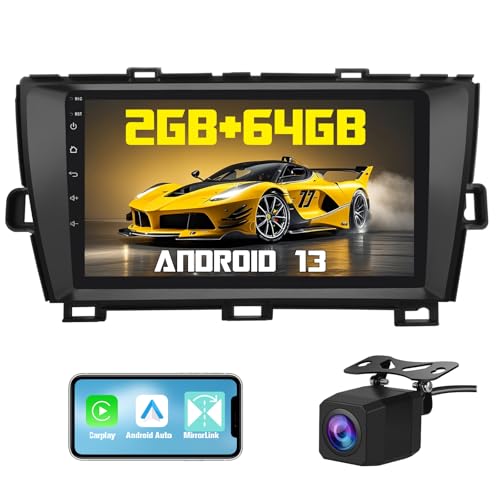
The Pyniro runs Android 13 with 2GB RAM and 64GB storage. It supports CarPlay, Android Auto, Bluetooth, GPS, AM/FM, and a backup camera. The 9-inch screen gives a wide, clear view and the UI is simple to use. It’s a good starter option for Prius owners who want modern features at a low price.
In day-to-day use it handled navigation and streaming with no surprises. Heavier multitasking can feel slow with 2GB RAM, so I recommend this mainly for drivers who use one primary app at a time. It’s a good entry-level upgrade and easy to live with if you are not a power user.
Pros:
- Affordable Android 13 upgrade
- Wireless CarPlay and Android Auto
- Backup camera and SWC support
- Clear, simple interface
- Good for light app use and daily commutes
- Solid value for basic needs
Cons:
- 2GB RAM can limit multitasking speed
- JBL support may need extra hardware
- Screen brightness is decent but not class-leading
My Recommendation
Choose the Pyniro if you want a simple and low-cost way to add wireless CarPlay/Android Auto. It suits light users who want maps, music, and calls without extra frills. Set your expectations and you’ll be happy. It’s one of the Best Stereo Upgrades for Toyota Prius when you need essentials at a fair price.
| Best for | Why |
|---|---|
| Entry-level upgrades | Low cost with key modern features |
| Light app users | Stable for maps, music, and calls |
| DIY beginners | Simple UI and straightforward setup |
Common Issues and Troubleshooting Tips
Here are simple fixes I use when something goes wrong:
- Phone won’t pair wirelessly: reboot both devices, remove old pairings, and ensure WiFi and Bluetooth are on. Try a wired connection once to verify CarPlay/Android Auto works.
- Steering wheel controls don’t respond: check the CANbus adapter wiring and set the SWC protocol in the unit’s settings. A quick mapping step usually fixes it.
- JBL audio missing or weak: verify the JBL amp harness and gain settings. In some cases a line output converter (LOC) or specific JBL adapter is needed.
- Backup camera image is fuzzy: use an AHD camera or check the camera jumper settings. Ensure the reverse wire is connected to the correct reverse light circuit.
- FM reception poor: use an OEM antenna adapter and check grounding. Some units allow AM/FM sensitivity tweaks in firmware.
FAQs Of Best Stereo Upgrades for Toyota Prius
Do I need special parts if my Prius has JBL?
Yes. JBL systems use an external amp. Choose a head unit that supports JBL or buy the needed harness and CANBUS interface.
Will I lose steering wheel controls?
No, not if you pick a unit with SWC support. Most models here retain volume, track, and call buttons.
Does wireless CarPlay or Android Auto drain my phone faster?
A little more than wired. It uses WiFi and Bluetooth. Most drivers find the ease worth the small battery hit.
Can I install these at home?
Many can. Non-JBL installs are easier. JBL setups may take more time and careful wiring. Read the guide and label everything.
Will these stereos show climate or energy info?
They won’t replace factory energy screens. Your stock displays still show that. The new unit handles audio, nav, and apps.
How long does installation take?
For a non-JBL Prius expect 1–2 hours if you have the right harness and tools. JBL installs typically add 30–90 minutes for the extra wiring and CANbus setup. If you’re new to wiring, plan for more time or hire a pro.
Final Verdict: Which Should You Buy?
If you have JBL and want the most seamless upgrade, the Inefala Android 15 is excellent. For non-JBL value, the Android 12 Radio for Prius 2010–2015 shines.
On a tighter budget, the Pyniro is a smart pick. Each option here ranks among the Best Stereo Upgrades for Toyota Prius, so choose based on JBL, speed needs, and budget.
Quick Buying Guide: Match Features to How You Drive
- If you use maps and navigation daily: prioritize CPU/RAM (4GB+), GPS, and offline maps.
- If you keep the factory JBL: choose units that explicitly list JBL compatibility or include the correct harness.
- If you want the cleanest look: get the dash trim kit and antenna adapter for a factory finish.
- If you value camera clarity: look for AHD camera support and high-resolution inputs.
- Power users and long trips: choose higher RAM/storage (6GB+/128GB) for apps, media, and caching.
If you want, tell me your Prius model year and whether it has JBL. I can recommend the best exact unit, harnesses, and a step-by-step install checklist for your car. I’ve installed many of these and I’m happy to guide you through the parts and process.

I’m Sarah, a passionate product analyst and content contributor specializing in automotive accessories at CaroraHub. With a keen eye for detail and a love for hands-on testing, I deliver honest, data-driven reviews that help shoppers make smarter buying decisions.