Toyota Prius drivers often ask how their car uses energy at any moment. The energy flow screen is a simple, live map of that flow. I use it every day. It helped me cut fuel use and spot small problems early. If you want to save gas, protect the hybrid battery, or just understand your Prius better, this screen is worth learning. Below I explain each part of the display, what the icons and arrows mean, and how to use that info to drive smarter and care for your car.
Understanding The Toyota Prius Energy Flow Screen
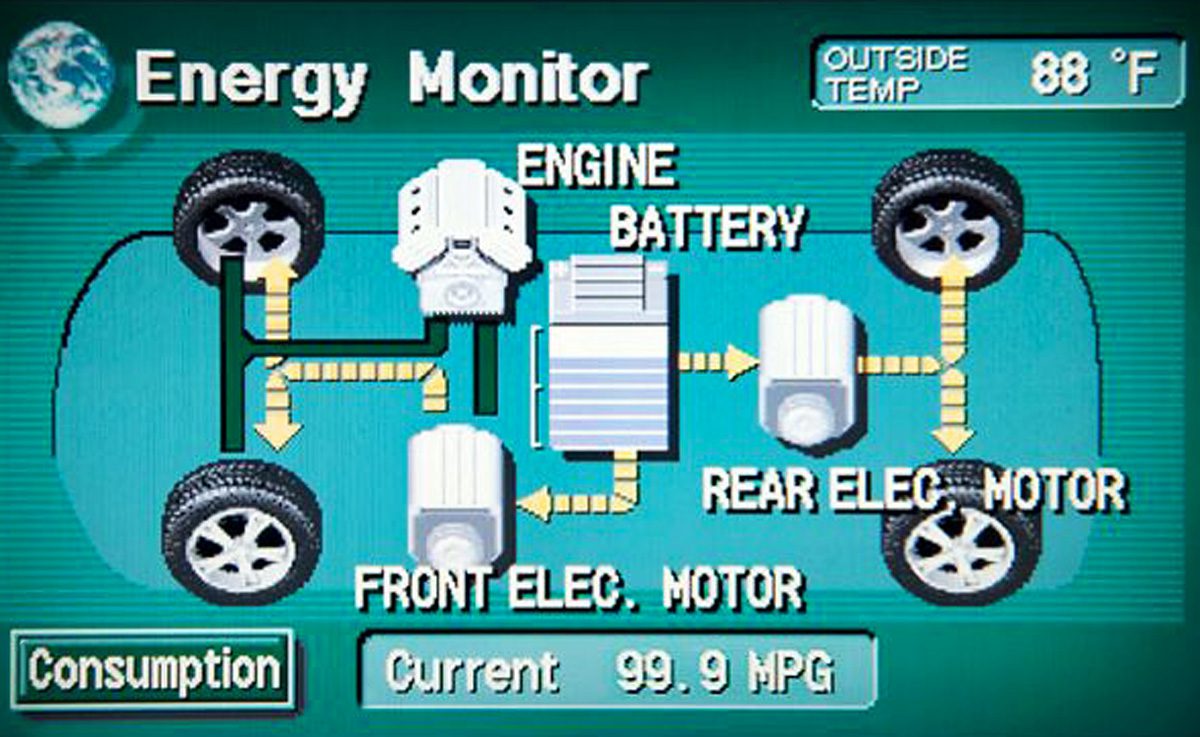
The energy flow screen sits at the heart of Prius hybrid tech. It gives a live view of how power moves between the gasoline engine, the high-voltage battery, the motors, and the wheels. On most models you will find it on the main infotainment screen. The display uses icons, colors, and moving arrows to show what the car is doing right now.
When you press the “Energy” or “Display” button on the dash, the screen appears. You will see pictures of a gasoline engine, a battery, and wheels. Arrows animate between these icons. Each arrow shows the direction of energy. For example, when the engine charges the battery, an arrow moves from engine to battery. When the electric motor drives the car, an arrow moves from battery to wheels. If you press the gas pedal hard, arrows may flow from both engine and battery to the wheels.
This visual language is simple once you know what the colors and arrows mean. I use it to choose when to ease off the throttle, when to coast, and when to let regen do the work.
Quick glossary: terms you’ll see and why they matter
- HV battery (high-voltage battery): The main hybrid pack. It feeds the electric motors.
- SOC (state of charge): How full the HV battery is.
- Regeneration (regen): Capturing kinetic energy during braking to charge the battery.
- EV mode: Electric-only driving at low speed when battery charge allows.
- Inverter / motor-generator: Parts that convert battery DC to AC for the motors, and back during regen.
- MG1 / MG2: Motor-generator names used inside Toyota hybrids. You don’t need them to read the screen, but they show how power splits inside.
What Does The Energy Flow Screen Show?
The display gives you five main types of information:
- Engine status: Is the gasoline engine running or off?
- Battery charge: How full is the high-voltage battery?
- Energy flow direction: Where is power moving right now?
- Regeneration activity: Is the car recapturing energy during braking?
- Drive mode: Are you in EV (electric only), hybrid, or charging mode?
Each item helps you make better choices when you drive. For example, if the battery is nearly full, you might use more electric power to save gas. If the engine runs too often, that can flag a problem or a heavy HVAC load.
How To Read The Arrows And Icons
The arrows and icons follow simple rules:
- Yellow arrows: Show energy going from the engine to the wheels or to the battery.
- Green arrows: Show energy from the battery to the wheels (pure electric drive).
- Blue arrows: Show regeneration—energy moving back into the battery when braking.
- Static icons: Engine, battery, and wheels stay on screen while arrows animate.
Common energy flows you’ll see:
- Engine → Wheels: Gas engine is powering the car.
- Battery → Wheels: Electric motor is driving the car.
- Engine → Battery: Engine is charging the hybrid battery.
- Wheels → Battery: Regenerative braking is charging the battery.
- Engine + Battery → Wheels: Both sources power the car for strong acceleration.
Watch the screen for these patterns. I glance at it on new routes and in heavy traffic. It teaches you what normal looks like for your Prius.
Key Benefits Of Monitoring The Energy Flow Screen
Why spend time watching this screen? These are the big wins:
- Increase fuel efficiency: You’ll see when you use electric versus gasoline power.
- Maximize battery life: Avoid deep drains and constant full charge cycles.
- Improve driving habits: Learn to accelerate and brake to favor electric drive.
- Spot problems early: Unusual patterns can warn of hybrid system issues.
I once caught a weak regen system early by spotting fewer blue arrows. Fix was simple and cheap compared with the cost of a failing pack.
Common Scenarios On The Energy Flow Screen
Typical patterns you will see while driving:
- Starting from a stop: Usually the car moves on battery only. Green arrows go from the battery to the wheels.
- Normal acceleration: Both engine and battery may power the wheels. Arrows flow from both.
- Cruising at low speed: Often electric-only. No engine arrows.
- Cruising at highway speed: Mostly the engine powers the wheels and may charge the battery.
- Braking or going downhill: Blue arrows go from wheels to battery—regenerative charging.
- Hard acceleration: Engine and battery both send power to the wheels.
- Idling or stopped: Arrows stop; sometimes the engine runs to charge the battery or run HVAC.
By watching these, you learn how your driving style changes fuel use and battery state.
Table: Typical Energy Flows By Driving Situation
Here’s a quick comparison of what you’ll see on the energy screen during different driving situations.
| Situation | Arrows Direction | Power Sources | Battery Effect |
|---|---|---|---|
| Stop & Go Traffic | Battery → Wheels | Electric Motor | Battery drains slowly |
| Steady Highway | Engine → Wheels/Battery | Engine, sometimes battery | Battery charges |
| Regenerative Braking | Wheels → Battery | Electric Motor (reverse) | Battery charges |
| Hard Acceleration | Engine + Battery → Wheels | Engine + Electric Motor | Battery drains quickly |
| Coasting | None, or Wheels → Battery | Minimal power | Battery may charge slightly |
How To Use The Screen For Maximum Fuel Economy
The energy flow screen is not just a display. It’s a tool. Here’s how to use it.
Monitor When The Engine Starts
Many drivers don’t notice how often the engine starts. Watch for yellow arrows. Try to drive smoothly to stay on battery power longer. For example, ease off the gas when moving from a stop. Often the car will stay in electric drive if you press lightly.
Use Regenerative Braking
Each slow down is a chance to capture energy. The screen shows blue arrows during regen. Slow down early and gently. Avoid late, hard braking. You get more recovered energy that way.
Watch Battery Level Carefully
The battery icon shows bars or a color scale. If the pack is near empty, the engine will work more. If it’s full, the car can use more electric power. Aim to keep the SOC in the mid range. Constant extremes (very low or very high) place more stress on the battery.
Plan For Hills
Uphills drain the battery fast. Downhills can charge it. When possible, let regen charge the pack downhill and then use that energy to climb. I time my acceleration to conserve the stored charge for steeper sections.
Avoid Aggressive Driving
Quick starts and heavy braking force the engine and battery to work harder. The screen will show big flows from both. Gentle acceleration and coasting are kinder to fuel use and battery life.
Table: Battery Charge Vs. Driving Strategy
See how battery level can change your driving approach.
| Battery Level | Suggested Driving | What to Avoid |
|---|---|---|
| Low (1–2 bars) | Gentle acceleration, limit electric use | Hard acceleration, long EV-only runs |
| Medium (3–6 bars) | Normal hybrid driving | Nothing; this is ideal |
| Full (7–8 bars) | Use more electric drive, short EV mode | Long downhill charging, engine idling |
Credit: blog.consumerguide.com
Advanced Tips For Monitoring Energy Flow
Once you know the basics, the screen can tell you even more. Here are advanced tips many Prius owners miss.
1. Track Patterns Over Time
Don’t check the screen just once. Watch it across trips and weather. Note how SOC, regen, and engine starts change. I keep a mental log of how my car behaves on cold mornings versus warm afternoons. Over time that pattern reveals small faults or changes in battery health.
2. Learn When The Engine Runs For Heating Or AC
The engine will start to run HVAC or to warm the battery. The energy screen can show engine activity even when the car is stopped. If you want more EV driving, reduce cabin heating or AC when possible. Pre-conditioning while plugged in (if available) is even better.
3. Use The “ev Mode” Button Wisely
Some Prius models have an EV button for pure electric driving. Use the energy screen to confirm EV mode—green arrows and no engine icon. EV mode works best at low speed with a well-charged battery. Don’t expect long EV range from a standard Prius battery; it’s small by design.
4. Spot Battery Reconditioning Cycles
Occasionally the car runs the engine to rebalance or condition the battery. The screen shows engine-to-battery arrows even when stopped. This is normal. But if it happens often, the pack may be aging and should be checked.
5. Compare Different Driving Routes
Try two routes to your destination and watch the energy screen. One may use more electric driving or capture more regen. Small route choices add up. I switched a daily route and cut fuel use by a few percent.
Troubleshooting: When The Screen Shows Unusual Patterns
Sometimes the energy flow screen reveals issues. Here are warning signs and what they might mean.
- Battery never charges: If you always see an empty battery or no arrows to the battery, the hybrid system may have a fault.
- Engine always runs: If the engine is on even at low speed, the car may be in a protected mode or the battery may be weak.
- No regeneration arrows: If you never see blue arrows during braking, the regen system may be disabled or the brake system needs service.
- Battery always full or empty: A healthy battery fluctuates. If it is stuck at a high or low level, have it checked.
- Screen not updating: If the display freezes or lags, try rebooting the infotainment system. If that fails, a technician may need to inspect it.
If you see these signs, get a qualified hybrid tech to check the car. A simple diagnostic can find issues before they get worse.
When to Visit a Dealer or Hybrid Specialist
If symptoms persist for more than a day or two, or if the car shows warning lights, take it in. Ask the shop for a hybrid-system check that logs SOC and regen behavior. Many shops can read hybrid fault codes that normal scanners do not.
How Weather And Temperature Affect The Energy Flow Screen
Weather changes how the Prius uses energy. Cold weather is the biggest factor. In winter the engine runs more to heat the cabin and to warm the battery. You will see more yellow arrows and less pure-electric driving. In hot weather the AC makes the engine run more often, too.
If you live where temps swing a lot, expect different energy patterns. Park in a garage if you can. Pre-heat or pre-cool the car while plugged in (if you have that option). Also try to reduce short trips in cold weather—those trips force the engine to run more often.
Table: Energy Flow Patterns By Weather
Here’s how the screen often changes with the seasons.
| Weather | Engine Usage | Battery Usage | Regeneration |
|---|---|---|---|
| Winter (Cold) | High (for heating) | Low | Normal |
| Summer (Hot) | Medium–High (for AC) | Medium | Normal |
| Spring/Fall (Mild) | Low | High | High |

Credit: www.reddit.com
Non-obvious Insights For Experienced Monitoring
These tips come from watching the screen over years of driving.
- Battery temperature matters: Hybrids protect the battery in extreme temps. If it’s very hot or cold, the car relies more on the engine. That shows on the energy screen.
- Short trips reduce efficiency: The car may run the engine for several minutes after startup just to warm systems. Combine errands where you can.
- Downhill charging has limits: If a long downhill fills the battery, regeneration stops. The car may use engine braking to slow down, and the screen will show no more arrows to the battery.
Read the screen like a habit list for your Prius. Small changes add up over months.
How The Energy Flow Screen Has Changed Across Prius Generations
You’ll notice the energy flow screen improved over the years. Early Prius models used simple arrows and basic icons. Newer models (2016 and later) show more detail. They may include real-time SOC, engine temp, efficiency ratings, and trip energy summaries.
Some new systems also log energy use over time or show charts for the trip. These help you see long-term trends, not just what’s happening now. If your Prius is newer, explore the menus. You may find history or economy scores that add context to the live view.
Using The Energy Flow Screen For Maintenance
The screen can help you spot maintenance needs before lights come on.
- Hybrid battery health: If the pack drains faster than before, or the engine runs more, the battery may be aging.
- Engine and hybrid system: Unusual energy flows, like constant engine-on, can warn of faults.
- Brake wear: If regen feels weaker (fewer blue arrows), mechanical brakes may be handling more braking. That can mean worn pads or a regen control issue.
Check the screen regularly. I compare how my car behaves now with how it behaved six months ago. That quick check often saves time and money.
Teaching New Drivers To Use The Energy Flow Screen
If someone else drives your Prius, teach them the basics. Explain the arrows and the meaning of green, blue, and yellow. Encourage gentle driving. Many new drivers instinctively floor the gas. Show them how light pressure keeps the car in electric mode.
Make it a short lesson. Ask them to try to keep the car in EV or hybrid-efficient mode for one drive. It’s a quick way to build better habits.
The Future Of Prius Energy Monitoring
Toyota keeps improving energy displays. Future systems may show battery health predictions, smarter route planning, and smartphone apps that track your energy use. Real-time energy screens will likely become common in many cars as drivers want more control over fuel and energy costs.
Until then, the Prius energy flow screen is one of the best real-time tools for eco-friendly driving.
Frequently Asked Questions
How Often Should I Check The Prius Energy Flow Screen?
Glance at the screen every few minutes, especially in stop-and-go traffic or when you are learning. Over time you’ll sense when the car is in electric or gas mode and won’t need to look as often.
Can The Energy Flow Screen Help Diagnose Hybrid Battery Problems?
Yes. If the battery icon stays empty or full, or energy arrows act oddly, that may mean a problem. A proper diagnosis by a professional is still needed to confirm battery health.
Why Does My Prius Engine Run When Stopped, Even If The Battery Looks Full?
The engine may run to heat the cabin, run the AC, or to rebalance the battery. This is normal in extreme temperatures. If it happens all the time, have it checked.
Does Monitoring The Energy Flow Screen Really Save Money?
Yes. Drivers who change habits after watching the screen can see fuel savings of 10% or more. You also extend the hybrid battery life by avoiding deep discharges and heavy loads.
Where Can I Learn More About Hybrid Technology And Energy Flow?
A good start is the official Toyota Prius page on Wikipedia: https://en.wikipedia.org/wiki/Toyota_Prius. It explains hybrid systems and how Toyota evolved them over time.
By learning to monitor your Toyota Prius energy flow screen, you unlock more value from your hybrid car. You’ll save fuel, protect the battery, and enjoy a smoother, more efficient drive every time you get behind the wheel.

Credit: www.ecrostech.com

Hello, I’m Norman. I work as a car researcher. I am the voice behind CaroraHub. I have over 15 years of experience. I give simple and useful car advice. I help with car care, cleaning, and small repairs. My goal is to help you keep your car healthy. I want car care to be easy and cheap for you. You can trust my tips to keep your car working well for a long time.