Every year, millions of drivers leave their cars parked on city streets, in dim lots, or outside their homes. We all hope our vehicles stay safe. I’ve had my share of close calls. That’s why I value parking mode in dash cams. For many car owners, parking mode isn’t just a nice-to-have. It’s a trusted guard. Whether you worry about hit-and-runs, theft, or vandalism, parking mode helps protect your car when you’re away.
A dash cam does more than record trips. With the right setup, it watches your car while it’s parked. It can capture key evidence if something happens. But how does parking mode work? And why should you trust it to guard your vehicle?
I’ll walk you through parking mode: what it is, how it works, setup tips, and what to watch out for. I’ll also share practical steps I use to test and tune my own dash cam systems.
What Is Parking Mode In Dash Cams?
Parking mode is a special setting on many modern dash cams. When your engine is off and the car is parked, parking mode keeps the camera ready. It only records when something important happens. That saves battery and storage. It is different from normal driving recordings.
Most dash cams with parking mode use one or more triggers to start recording:
- Motion detection: The camera starts recording when it senses movement near the car. This is common for parking surveillance and curbside protection.
- Impact detection (G-sensor): A G-sensor detects shocks or vibrations. A bump wakes the camera and saves footage—very useful for hit-and-run evidence.
- Time-lapse recording: The camera takes periodic photos (for example, every 1–5 seconds) and compiles them into a video. This gives a compressed view of long parking periods.
These triggers turn your dash cam into a silent guard. It watches the car when you can’t.
Why Parking Mode Matters
Cars are often most vulnerable when parked. Break-ins, hit-and-runs, and vandalism can happen fast. Most incidents occur while owners are away—at work, running errands, or sleeping. Regular dash cam recording only covers driving time. That leaves a gap.
Parking mode fills that gap. It can:
- Capture evidence when someone damages your car and leaves.
- Deter criminals when they see a visible camera or an LED indicator.
- Provide proof for police reports and insurance claims.
If you park in public places, busy streets, apartment lots, or high-risk areas, a dash cam with reliable parking mode is one of the smartest safety upgrades you can add.
How Parking Mode Works
Dash cams use different methods to stay alert while your car is off. Below are the main parking mode types and how they work.
Motion Detection
Motion detection watches the camera’s field of view for moving objects. When movement crosses a threshold, the dash cam starts recording. This saves storage and power compared to continuous recording.
Motion detection can trigger on harmless things—swaying trees, shadows, or rain. Better dash cams use smarter algorithms or object recognition to cut false alarms. When buying, look for models that mention “AI detection,” “person/vehicle detection,” or “advanced motion filtering.” These terms help reduce meaningless clips.
Impact Detection (g-sensor)
A G-sensor measures sudden acceleration changes. If someone bumps your parked car, the G-sensor detects the shock and triggers recording. This is ideal for catching hit-and-run drivers in parking lots.
Many dash cams let you adjust G-sensor sensitivity. I set mine to medium. Too high and it wakes for small vibrations. Too low and it may miss real hits. Test and tune the sensitivity for the parking location.
Time-lapse Recording
Time-lapse mode takes photos at set intervals. The camera combines them into a fast video. Time-lapse uses less power and saves space. It gives a clear overview of the whole parking period.
Time-lapse can miss sudden short events if the interval is long. Combining time-lapse with motion or impact triggers provides broader coverage. Some models switch to full video when motion is detected.
Buffered Parking Mode
Buffered parking mode is a premium feature. The camera records a short loop while idle (for example, the last 10–20 seconds). It only saves the loop if an event occurs. This captures what happened before and after a trigger.
Buffered mode is excellent for understanding how an incident started. I rely on buffered clips when the cause is unclear, such as a slow scrape or a staged collision.
Power Management In Parking Mode
Power is the biggest challenge for parking mode. Car batteries aren’t built to run accessories for long when the engine is off. If a dash cam draws too much current, it can drain the battery.
Manufacturers use several solutions:
- Low-power standby: The camera sleeps and wakes only when triggered.
- Hardwiring kits: These tie the dash cam to the car’s fuse box and often include a voltage cutoff to stop battery drain.
- External battery packs: A separate battery supplies the dash cam so your car’s main battery stays safe.
Picking the right power solution depends on how long you need parking coverage and on your vehicle’s battery health. I use a hardwire kit with a voltage cutoff for daily parking. For extended trips, I add an external battery pack.
Types Of Dash Cams With Parking Mode
Not every dash cam supports parking mode. And not all parking modes work the same. Here’s a market breakdown to help you choose the right dashcam for parking surveillance.
Basic Single-channel Dash Cams
Single-channel units record from a single front-facing lens. Entry-level models may include basic motion or impact detection. They are budget-friendly and cover only the front view.
Dual-channel Dash Cams
Dual-channel dash cams include a rear camera plus the front. They give better coverage for parking incidents behind you—common in parking lots. Many dual-channel models include stronger parking modes and buffered recording.
3-channel And 4-channel Systems
These systems add side or interior cameras. They are useful for rideshare drivers, fleet use, or owners who want complete coverage. They often include advanced parking features, but they cost more and need more storage.
Smart Dash Cams (cloud-connected)
Higher-end dash cams can connect to Wi‑Fi or mobile networks. They can send push alerts to your phone when parking mode detects an incident. Some let you view live video remotely. These features are handy but use more power and may require a subscription.
Table: Comparison Of Parking Mode Features In Dash Cam Types
| Dash Cam Type | Coverage | Parking Mode Level | Typical Price Range |
|---|---|---|---|
| Single-Channel | Front only | Basic (motion/impact) | $50–$150 |
| Dual-Channel | Front + Rear | Standard to Advanced | $120–$300 |
| 3/4-Channel | Front, Rear, Sides/Interior | Advanced (buffered, cloud) | $250–$500+ |
| Smart (Cloud) | Varies | Advanced + Remote Alerts | $200–$500+ |
Setting Up Parking Mode: What You Need
Good parking-mode performance needs the right gear and setup. Below are the essentials and practical tips from my own installs.
- Dash Cam with Parking Mode: Verify the model supports motion, impact, time-lapse, or buffered modes before you buy. Look for terms like “parking surveillance” or “parking recording.”
- Hardwiring Kit or OBD Cable: These provide continuous power and often include a voltage cutoff to protect your car battery.
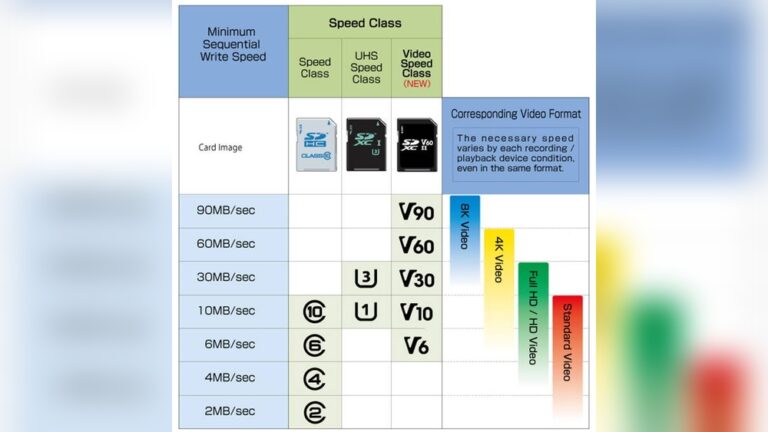
- Memory Card (High Endurance): Use SD cards labeled “high endurance” or “dashcam” grade. They handle constant writes and heat better than regular cards.
- Proper Installation: For safety and reliability, consider professional installation. Bad wiring can cause drains or lose function.
External battery packs are useful if you want long unattended coverage or if your climate has extreme temperatures. I keep one in the trunk when I travel for long parking periods.
Quick Checklist Before You Enable Parking Mode
Before you leave your car, run this quick check:
- Confirm the dash cam is set to parking mode in its menu.
- Verify voltage cutoff is active (if hardwired).
- Check available space on the memory card.
- Test triggers by simulating a small knock or walking past the vehicle.
How I Test My Parking Mode
I do a brief test after install. I switch the car off, wait a minute, then tap the bumper lightly and walk across the camera view. I then review the saved clip. This helps me set G-sensor and motion sensitivity to balance false alerts and missed events.
Real-world Scenarios: How Parking Mode Helps
Hit-and-run Accidents
Picture someone scraping your parked car and driving off. With parking mode, the dash cam can record the entire event. You might capture the other vehicle’s license plate and direction of travel. That footage helps police and insurance companies identify the responsible party.
Vandalism And Theft
Parking mode is a strong deterrent. Thieves and vandals think twice when they see a camera. If they still act, you get video evidence. Some dash cams include LED warnings or voice alerts that tell people they’re being recorded. That can stop problems before they start.
Insurance Disputes
After a parking lot accident, statements often conflict. Video footage shows the facts. It saves time in claims and proves responsibility. I’ve used clips to speed up minor claims and avoid unfair charges.
Workplace And Apartment Parking
Overnight parking in shared lots has higher risk. Parking mode gives you 24/7 record of what happens. If your car gets dinged, you have evidence to show property managers or police.

Credit: www.youtube.com
Technical Details: How Dash Cams Save Power In Parking Mode
Worrying about a dead car battery is natural. Thankfully, manufacturers use smart methods to avoid this. Here are the main tech details and practical tips.
- Sleep Mode: The camera uses a low-power state and wakes only when needed.
- Voltage Cutoff: Hardwiring kits often include a cut-off that stops power to the dash cam when battery voltage drops to a safe level.
- External Batteries: Dedicated power packs run the dash cam without using the car battery.
Many dash cams let you tweak sensitivity and recording length. That helps balance coverage and battery life. I often set a short post-event recording window to save space while keeping context.
Hardwiring Best Practices
If you hardwire, connect to a fused circuit and use a kit with a built-in low-voltage cutoff. Avoid tapping into critical circuits like airbags. If unsure, get a qualified installer. I recommend a professional for newer cars with complex electrical systems.
Choosing an External Battery
External batteries come in sizes from 5 Ah to 20 Ah and up. A 10 Ah unit typically powers a dash cam for a day or two in parking mode, depending on settings. Look for units with built-in chargers and temperature protection if you live in an extreme climate.
Table: Power Consumption Of Dash Cams In Parking Mode
| Parking Mode Type | Average Power Draw (W) | Typical Runtime (Car Battery) |
|---|---|---|
| Motion/Impact Detection | 0.3–0.6 | 48–72 hours |
| Time-Lapse Recording | 0.5–0.8 | 24–48 hours |
| Continuous Recording | 0.8–1.5 | 12–24 hours |
| Buffered Mode | 0.4–0.7 | 36–60 hours |
These figures are estimates. Real runtimes depend on your dash cam model, the health and capacity of your car battery, and temperature. Cold weather reduces battery capacity and shortens runtime.
Credit: www.blackboxmycar.com
Tips For Using Parking Mode Effectively
- Choose the right dash cam: Pick a model with adjustable sensitivity, good night vision, and reliable parking mode features.
- Use a high-endurance memory card: These last longer under constant write cycles and in heat.
- Check local laws: Rules differ on audio recording and sharing footage.
- Install visibly: A visible camera often deters bad behavior.
- Set correct sensitivity: Balance false alerts and missed events. Test and tweak settings for each parking spot.
- Monitor battery health: If you use parking mode often, check the car battery regularly.
- Consider an external battery: Useful if your car sits for many days or in extreme weather.
Common Problems And How To Avoid Them
Battery Drain
A dead battery is the biggest fear. Use a hardwiring kit with a voltage cutoff or an external battery. Don’t rely on the cigarette lighter port—many cars cut power there when the engine is off. If you use parking mode frequently, test your battery health every few months.
Missed Events
If sensitivity is too low, your dash cam may miss events. Simulate real conditions: knock a bumper, walk past, or spin a wheel. Review the footage and adjust settings until you’re confident.
Overwriting Important Footage
Parking mode can fill SD cards fast. Most dash cams overwrite old files automatically. If an event occurs, immediately protect or back up the clip. Look for models with “event protection” or manual file lock features.
Hot Weather Shutdowns
Many dash cams shut down in very high heat to protect electronics. If you live in a hot climate, choose models rated for high temps. Use a windshield shade or park in shade when you can. Heat shortens SD card life too.
False Positives
Motion triggers can be set off by trees, rain, or animals. Lower sensitivity, mask parts of the camera view (if supported), or upgrade to a camera with AI-based detection to reduce false clips.
Table: Pros And Cons Of Parking Mode Types
| Parking Mode Type | Pros | Cons |
|---|---|---|
| Motion Detection | Saves storage, low power | May miss fast or small events; false alerts |
| Impact Detection | Captures hits, great for hit-and-run | Doesn’t record vandalism without impact |
| Time-Lapse | Records everything, easy review | Uses more power, may miss details |
| Buffered | Captures before/after events | Requires more advanced dash cam |
The Cost Of Dash Cams With Parking Mode
Prices vary. Basic models with simple parking mode can start near $50. Advanced dual- or multi-channel systems with buffered mode and cloud features can exceed $500. Many drivers find good balance in the $120–$250 range.
Include the cost of a hardwiring kit ($20–$50) or external battery ($100–$250). Professional installation adds $50–$150 but can prevent wiring mistakes and protect your car’s electrical system.
Legal And Privacy Issues
Recording in public is legal in many places. But laws differ on audio recording and data protection. Be aware before you share footage online or use audio captures.
- Some US states require consent to record audio.
- The EU and UK have stricter data protection rules for personal footage.
- Apartment complexes or employers may have camera policies.
Always check local laws before you use or publish dash cam footage. For more context, see the Wikipedia page on dash cams.
Future Trends In Parking Mode Technology
Parking mode is improving fast. Here are trends to watch:
- AI-powered detection: Better object recognition to cut false alerts and detect people, license plates, and vehicles.
- Cloud storage: Auto-upload of events so evidence is safe even if the camera is stolen or damaged.
- Solar charging: Solar-assisted systems to extend parking runtime for long-term surveillance.
- Integration with car security: Dash cams linking to factory alarms and sending push alerts to your phone.
These advances will make parking mode more reliable, smarter, and easier to use.

Credit: scotchiescakes.com
Non-obvious Insights
Many people assume parking mode is always recording. Most dash cams do not. They sleep and wake on triggers. That design saves power and storage. It also explains why you must tune sensitivity for each location.
Another point to note: extreme temperatures affect both dash cams and SD cards. If you live where it gets very hot or very cold, buy hardware rated for that range. Cheap SD cards often fail in heat or after heavy use. That risks losing critical footage.
Frequently Asked Questions
How Long Can A Dash Cam Record In Parking Mode Before Draining The Battery?
It depends on the camera, the power setup, and your battery. With a hardwired setup and a healthy battery, most dash cams run 24–72 hours in motion or impact detection mode. Time-lapse or continuous recording shortens that to 12–24 hours. External battery packs can extend runtime to several days.
Does Parking Mode Work At Night Or In Low Light?
Yes. Most modern dash cams for parking mode have low-light sensors or infrared night vision. That helps record clear video at night. Quality varies by model. For best results, choose a dash cam with strong night performance and park near lights when possible.
Do I Need To Hardwire My Dash Cam For Parking Mode?
Hardwiring is recommended for most parking mode use. It supplies power when the car is off and usually includes a voltage cutoff to protect the battery. Some dash cams work from the cigarette lighter, but many cars cut power there after shutdown. External batteries are a safe alternative.
Can Parking Mode Affect My Car Battery’s Lifespan?
If installed with a proper voltage cutoff or external battery, parking mode should not harm your battery. Issues appear if the dash cam draws power too long or if your battery is weak. Check battery health regularly and avoid long unattended use without driving.
Is Parking Mode Worth The Extra Cost?
For many drivers—especially in urban areas or places with higher risk—parking mode is worth the price. It provides evidence for claims, deters criminals, and gives peace of mind. If you value your car’s safety, it is a smart investment. I’ve found that the time and money saved in disputes and repairs often justify the cost.
Parking mode in dash cams is more than a fancy feature. It solves real problems. By knowing how it works, setting it up correctly, and choosing the right features, you can protect your car every time you park. I hope these tips help you pick and tune a system that works for your needs.

I am Julian Drive, an automotive enthusiast and repair expert with over 7 years of hands-on experience in vehicle maintenance. At Carora Hub, I simplify complex car issues into easy-to-follow DIY guides to help drivers stay safe and save on repair costs.