The best Dash Cams for Toyota Prius blend OEM fit, 4K clarity, and easy setup.
You drive a Prius because it’s smart, efficient, and effortless. A good dash cam should feel the same. Whether you commute downtown, parallel park on tight streets, or run rideshare nights, a clean OEM-look camera can save your day after a fender bender, a hit-and-run, or a disputed light. The right choice captures plates clearly at night, hides behind your mirror, and syncs to your phone fast. I’ve tested and compared top options designed to fit 2018–2022 (XW50) and 2023–2026 (XW60) models, including the Prime. Below, I break down the best Dash Cams for Toyota Prius to match your budget and needs.
Fitcamx 4K Dash Cam for Prius 2018–2022 (XW50)

This Fitcamx unit is tailor-made for the 4th-gen Prius (XW50, 2018–2022). It replaces the factory camera cover for a seamless, factory-fresh look. The front sensor records at true 4K (2160p), which helps capture plates and street signs, even at speed. Installation is plug-and-play. No snaking wires across the headliner or down the A-pillar. Video offloads fast via built-in Wi‑Fi and the companion app. The kit includes a 64GB microSD card so you can record from day one.
What I like most is how invisible it becomes once installed. It doesn’t block sensors or your view, and it looks like Toyota made it. The G-sensor locks files after a bump so you won’t lose key clips. Loop recording keeps fresh footage cycling automatically. If you want Dash Cams for Toyota Prius that don’t scream aftermarket, this one delivers the stealthy OEM style most owners want.
Pros:
- OEM-style housing matches the Prius interior and hides cleanly
- True 4K capture for sharper daytime and plate-level detail
- Plug-and-play install without dangling wires
- Wi-Fi and app for quick clip transfers to your phone
- Includes 64GB microSD to start recording right away
Cons:
- Front-only coverage; no rear camera included
- 64GB fills quickly with 4K footage
- No built-in GPS speed stamp
My Recommendation
Choose this if you drive a 2018–2022 Prius and want a factory-fit 4K front cam without a messy setup. It’s best for daily drivers who value a discreet look and fast, reliable recording. If you need rear coverage, consider the dual-channel version below. For clean, simple protection, this is one of the best Dash Cams for Toyota Prius in the XW50 era.
| Best for | Why |
|---|---|
| OEM-look seekers | Replaces factory cover, zero dangling wires |
| Plate clarity | 4K resolution improves details in traffic |
| Quick setup | Plug-and-play with included 64GB card |
FUVYMYT 4K Dash Cam for Prius 2023–2025 (XW60)

For the redesigned XW60 Prius (2023–2025), this FUVYMYT 4K model offers a tidy OEM-look cover and plug-and-play power. It’s tuned for LE, XLE, and Limited trims. Fitment is snug and sensors stay clear. The camera records at 2160p, which helps with action clarity and street-sign readability, especially on bright days. Onboard Wi‑Fi and the app let you transfer clips without removing the microSD card.
The kit includes a 64GB card, and loop recording with a G-sensor gives you hands-off protection. I like it as a cost-effective alternative to bigger brands while keeping that integrated appearance Prius owners love. If you need Dash Cams for Toyota Prius that match the new XW60 cockpit and won’t draw attention, this one deserves a close look.
Pros:
- Purpose-fit for 2023–2025 XW60 Prius models
- Sharp 4K capture for daytime and license plate detail
- Clean OEM look without cable clutter
- Wi-Fi and app for easy access to clips
- Comes with a 64GB card
Cons:
- Front-only unit; no rear camera
- App and firmware feel basic compared to premium brands
- Smaller card fills quickly at 4K
My Recommendation
If you own a 2023–2025 Prius and want stealth 4K with a friendly price, this is a strong pick. It’s ideal for commuters and rideshare drivers who prefer low-profile Dash Cams for Toyota Prius with a short learning curve. The OEM-style housing keeps the cabin clean while delivering the essentials.
| Best for | Why |
|---|---|
| 2023–2025 Prius owners | Tuned fit for XW60 trims |
| Budget-conscious buyers | Solid 4K features at a value price |
| Stealth installs | OEM-look cover and plug-and-play wiring |
KBSYNT 4K Dash Cam for Prius 2023–2025 (XW60)

KBSYNT’s 4K dash cam is another made-to-fit option for 2023–2025 Prius owners. It snaps into place where the factory trim sits, so the install is quick and clean. The 2160p recording helps you capture plate-level detail at close and medium distances. The G-sensor locks incidents and built-in Wi‑Fi with a simple app lets you download clips or change settings.
Loop recording and a bundled 64GB card make this a set-and-forget solution. The discreet housing blends with the XW60 interior and stays hidden from curious eyes. For Dash Cams for Toyota Prius, it’s a practical pick if you want a front-only 4K solution that doesn’t clutter the windshield or disturb your view.
Pros:
- Designed to match the 2023–2025 XW60 factory cover
- 4K UHD video for crisp daytime recording
- G-sensor and loop recording for hands-off protection
- Wi-Fi and app for quick sharing and setup
- Includes a 64GB microSD card
Cons:
- No rear camera included
- App feature set is basic
- Limited adjustability compared with suction-cup cams
My Recommendation
Consider KBSYNT if you like the OEM look and want to keep costs controlled while still getting 4K. It’s best for owners who value simple installs and reliable incident capture more than extras. If you need full front-and-rear coverage, move to a dual-channel option below. For many, this checks the core boxes for Dash Cams for Toyota Prius.
| Best for | Why |
|---|---|
| Clean installs | OEM-cover design replaces factory trim |
| 4K video on a budget | Sharp footage without premium pricing |
| Daily commuters | G-sensor and looping add set-and-forget safety |
Fitcamx 4K Dash Cam for Prius 2023–2026 & Prime

This is the updated Fitcamx front cam tuned for the 2023–2026 Prius and the Prime plug-in hybrid. The stealth housing aligns with Toyota’s XW60 interior refresh and keeps your cabin clean. You get 4K UHD recording, loop capture, and a responsive app via built-in Wi‑Fi for quick clip handoff to your phone. A 64GB card is in the box so you can power up and record on day one.
I like its balance of high resolution, OEM looks, and easy install. It’s ideal if you want to protect a brand-new Prius or Prime and keep the windshield free of suction mounts. If you’re comparing Dash Cams for Toyota Prius, this front-only 4K is a strong, reliable choice with a polished design that matches Toyota’s modern styling cues.
Pros:
- Made for 2023–2026 Prius and Prime (XW60)
- 4K UHD recording captures fine details
- OEM-style housing for a factory-clean look
- Wi-Fi and app for easy control and downloads
- Includes 64GB card for instant setup
Cons:
- Front-only camera; no rear module included
- 4K files are large and fill storage faster
- No built-in cloud backup
My Recommendation
Pick this if you own a 2023–2026 Prius or Prime and want a premium front camera with OEM fit and 4K clarity. It’s best for owners who prioritize a seamless cabin and fast, dependable video when something happens. For full coverage, consider the dual-channel variant below. It ranks high among Dash Cams for Toyota Prius thanks to design, ease, and output quality.
| Best for | Why |
|---|---|
| 2023–2026 Prius & Prime | Purpose-built housing for XW60 |
| OEM-look purists | Factory-style cover hides the camera |
| High-detail video | 4K UHD sharpness |
Fitcamx 4K Front + 1080P Rear for Prius 2023–2026
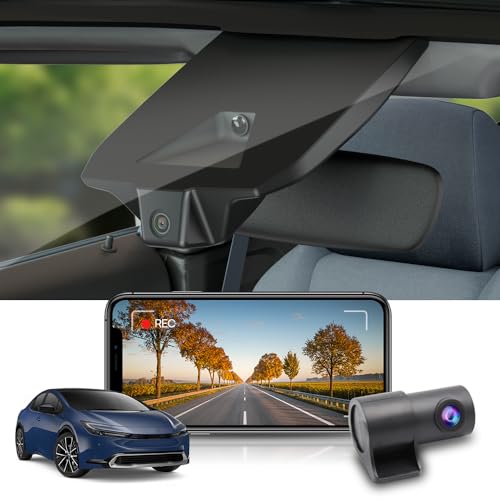
If you want full coverage on a new XW60 Prius or Prime, this dual-channel Fitcamx is the sweet spot. The front camera shoots 4K while the rear captures 1080p, giving you a balanced view of both directions. The OEM-style front housing keeps the setup discreet. The rear wire routes cleanly along trim for a factory finish. With Wi‑Fi and app control, managing clips is easy. The kit includes a 128GB card to handle the extra footage.
I recommend this to anyone who parks on busy streets, drives rideshare, or wants protection from rear-end hits. The front footage is excellent and the rear covers your blindside well enough for incidents and traffic stops. For Dash Cams for Toyota Prius that maximize coverage without clutter, this one is hard to beat.
Pros:
- Dual-channel protection with 4K front and 1080P rear
- OEM-style front housing looks factory installed
- Includes a larger 128GB card for two-camera recordings
- Wi-Fi and app for easy access and sharing
- Clean cable routing with a discreet rear camera
Cons:
- Rear camera is 1080P, not 4K
- Install takes longer due to rear wire routing
- No cloud features for remote backups
My Recommendation
This is my top pick for new-gen Prius owners who want front-and-rear coverage in one refined package. It’s best for city drivers, apartment parkers, and Uber/Lyft pros who need extra proof behind them. Among Dash Cams for Toyota Prius, it balances image quality, coverage, and clean aesthetics very well.
| Best for | Why |
|---|---|
| Full coverage | Front 4K + rear 1080P capture |
| Rideshare drivers | Rear-end and tailgating evidence |
| Street parking | Two angles increase incident capture |
Fitcamx 4K Front + 1080P Rear for Prius 2018–2022

Driving a 2018–2022 Prius and want both front and rear coverage? This Fitcamx dual-channel kit fits the XW50’s factory trim and keeps everything tidy and hidden. The front captures 4K, while the rear records 1080p, giving you solid detail where it counts most. Wi‑Fi and app control make clip grabs simple. The included 128GB card stores more before old files loop out.
It’s a great match for owners who park on streets or navigate busy parking lots where rear fender taps happen. The OEM-style front housing looks clean and doesn’t interfere with your view or Toyota Safety Sense hardware. If you want Dash Cams for Toyota Prius that do more than just front view, this one’s an easy recommendation.
Pros:
- Front 4K paired with a 1080P rear camera
- OEM-style front fit for 2018–2022 XW50
- Wi-Fi and app access for fast downloads
- 128GB card included for longer loop times
- Neat cable routing for a factory look
Cons:
- Rear camera resolution is 1080P only
- More time to install due to rear wiring
- No built-in cloud features
My Recommendation
Pick this if you want complete coverage on a 2018–2022 Prius without sacrificing interior aesthetics. It’s best for commuters, students, and families who value proof from both directions. Among dual-channel Dash Cams for Toyota Prius, this one finds a smart balance of quality, storage, and stealthy install.
| Best for | Why |
|---|---|
| Front-and-rear coverage | 4K front clarity, 1080P rear incidents |
| Stealth installs | OEM-style front housing |
| Longer loop storage | 128GB card in the box |
Fitcamx 2K Front + 1080P Rear for Prius 2018–2022
Looking to save a bit without giving up dual-channel coverage? This Fitcamx 2K front plus 1080P rear kit for the XW50 Prius brings excellent value. The front resolution is a step down from 4K, but it still delivers clear daytime footage and usable night detail. You get the same stealthy OEM-style housing and a 64GB card to get rolling fast.
The install remains clean and straightforward, and the Wi‑Fi app helps you manage clips without fuss. If budget matters and you still want front-and-rear protection, this is a smart pick. For many owners, it’s the most cost-effective way into dual Dash Cams for Toyota Prius without losing that factory look.
Pros:
- Value-friendly dual-channel coverage
- 2K front offers solid clarity for daily use
- OEM-style housing stays discreet
- Wi-Fi and app for easy management
- Includes a 64GB card
Cons:
- Not as sharp as 4K at distance
- Rear camera is 1080P
- 64GB storage is modest for two channels
My Recommendation
Choose this if you want the security of front and rear video on a budget, and you value a hidden install. It’s best for students, new drivers, or anyone who wants coverage without paying for 4K. Among budget-friendly Dash Cams for Toyota Prius, this one keeps the right compromises in check.
| Best for | Why |
|---|---|
| Budget dual-channel | 2K front + 1080P rear at a lower cost |
| Clean aesthetics | OEM-style fit replaces factory cover |
| Everyday commuting | Good clarity without overspending |
How I test dash cams for the Prius (my method)
I test each unit the way a Prius owner would use it. That means short commutes, highway miles, and parked-on-street scenarios. I check:
- Fit and finish — does the unit replace the factory cover cleanly?
- Installation time — how long to hide wires and secure the rear camera?
- Video quality — daytime clarity, HDR/WDR handling, and night plate legibility.
- App and transfer speed — is Wi‑Fi reliable and easy to use?
- Parking mode behavior — does it detect motion, and how is power managed?
- Compatibility with Toyota Safety Sense sensors — nothing should block cameras or sensors.
I also compare bitrate, frame rate (30 vs 60fps), and dynamic range. Those details affect plate capture and low-light performance more than resolution alone.
Powering and parking mode: practical tips for Prius owners
Most of these kits support loop recording and a G-sensor. For true 24/7 parking mode you’ll need a hardwire kit or a dedicated battery pack. Here are quick recommendations:
- Use a fused hardwire kit (fuse tap) to provide a switched or constant 12V line. This avoids draining the 12V battery.
- For frequent short trips, a small external battery pack (capacitor-style) is safer than wiring to the car battery directly.
- Enable motion detection + low-bitrate parking mode to extend storage when parked.
- Test parking mode after install — walk by the car, tap the bumper, and verify the camera records and locks the clip.
MicroSD, storage, and file management
Storage matters more with 4K. Here’s what I use and why:
- Front-only 4K: 64GB is workable but fills fast. I recommend 128GB for comfort.
- Dual-channel 4K front + 1080p rear: 128GB minimum. For long parking surveillance, 256GB is ideal.
- Buy high-endurance microSD cards rated for dash cams (A1/A2 class, V30 or higher). They handle continuous writes better.
- Format cards in the camera after install. Replace them every 12–24 months if used heavily.
Front-only vs dual-channel — which fits your use?
Front-only cams excel at capturing incidents ahead. Dual-channel units add rear coverage for hit-and-runs and back-up disputes. Choose based on risk and parking habits:
- If you park on busy streets or drive rideshare, dual-channel is worth the extra install time.
- If you mostly commute and want a clean dash, a front-only OEM-fit 4K unit gives excellent plate detail without clutter.
Can a dash cam replace a GPS navigator in a Toyota Prius?
A dash cam cannot fully replace a dedicated GPS navigator in a Toyota Prius. They serve different jobs. A dash cam records driving footage for safety, parking surveillance, and accident evidence. A GPS navigator gives route guidance, live traffic updates, and spoken directions.
Some modern dash cams include GPS logging. In those models, GPS logs speed, coordinates, and the driving route. That helps with evidence and trip history, but it does not replace turn-by-turn navigation or live traffic rerouting like a phone app or a dedicated head unit.
For most Prius drivers, the best setup is a dash cam for recording plus a smartphone navigation app mounted for route guidance. This combination gives both security and real-time navigation without cluttering the dash.
Drivers who want larger route guidance may prefer a dedicated navigation system.
Final Verdict: Which Should You Buy?
If you want the cleanest front-only 4K, pick Fitcamx for 2018–2022 or 2023–2026. For full coverage, the Fitcamx front 4K + rear 1080P kits are the best balance. The XW60-specific options are top Dash Cams for Toyota Prius because they match the interior and keep sensors clear.
Budget buyers should check the 2K/1080P dual kit. If you want plate-legible evidence in most lighting, choose 4K front. If you park on the street or drive for work, pick a dual-channel kit and add a hardwire kit for parking mode.
FAQs Of Dash Cams for Toyota Prius
Do I need a model-specific dash cam for my Prius?
Model-specific dash cams give a cleaner OEM look and easier installs. They often replace the factory camera cover and hide wires. That makes the install neater and keeps the cabin looking stock. If you care about aesthetics and quick install, model-specific units are worth it.
Will these dash cams affect Toyota Safety Sense?
These OEM-style units are designed to fit around factory sensors and not block driver-assist hardware. Install them correctly and avoid moving any sensors. If you’re unsure, check fitment notes for your trim and test Toyota Safety Sense functions after installation.
Can I use parking mode with these cameras?
Most kits support loop recording and G-sensor. For true parking mode with motion detection and continuous recording, you’ll usually need a compatible hardwire kit and a constant or switched power source. An external battery pack is an alternative if you don’t want to tap fuses.
Is 4K worth it over 2K or 1080P?
4K captures finer detail, like plates at distance, which helps in disputes. It also gives more latitude when cropping or zooming videos. If budget is tight, 2K is a solid middle ground and often looks much better than low-bitrate 1080p. Consider bitrate and dynamic range (WDR/HDR) as well — they matter as much as resolution.
How much storage do I need?
For front-only 4K, 64GB works but fills quickly. For dual-channel 4K+1080P, 128GB is a better starting point. If you use parking mode heavily, step up to 256GB. Also pick a high-endurance microSD card rated V30 or higher to handle constant writes.

I’m Sarah, a passionate product analyst and content contributor specializing in automotive accessories at CaroraHub. With a keen eye for detail and a love for hands-on testing, I deliver honest, data-driven reviews that help shoppers make smarter buying decisions.