The best OBD2 scanner for Toyota Prius makes warning lights easier to understand and costly guesses less likely.
A Prius can show a check-engine light, hybrid warning, or strange fuel-use change at the worst time. A basic code reader can tell you why the engine light came on, while a better scan tool may show live data or extra body-system faults. I compared three popular options for ease of use, Prius fit, phone support, code coverage, and value. The key point is simple: no universal scanner reads every Toyota hybrid module, so choose one that matches the fault you need to diagnose.
See the differences between my top picks at a glance.
🚘 Black Friday & Cyber Monday Automotive Parts & Accessories Deals
Upgrade your ride with popular car accessories, cleaning kits, diagnostic tools, replacement parts and automotive gear. Explore Amazon offers for both shopping events. Deals change fast!
AUTOMOTIVE PARTS AND ACCESSORIES DEALS →| Scanner | Connection | Best use | Main strength | Amazon |
|---|---|---|---|---|
| ANCEL AD310 | Wired | Simple engine codes | Easy plug-and-play use | View on Amazon |
| Veepeak OBDCheck BLE | Bluetooth | Phone-based checks | Small wireless design | View on Amazon |
| BlueDriver | Bluetooth | Deeper DIY diagnosis | Repair reports and added systems | View on Amazon |
For this review, I focus on real Prius ownership needs. These include reading emissions codes, checking live sensor data, clearing a code after a repair, and avoiding a bad diagnosis. I also explain what each tool cannot do. That matters with a Toyota hybrid because the car has more control units than a normal gas car.
A quick note about Prius compatibility
Most Toyota Prius models sold in the United States from 2001 onward use an OBD-II diagnostic connector. You will usually find it under the driver-side dash, near the steering column. The connector lets a scanner talk to the car’s diagnostic network.
Still, “OBD2 compatible” does not always mean “full Prius compatible.” Many low-cost scanners read standard powertrain codes from the engine computer. They may not read hybrid battery, ABS, airbag, body, or manufacturer-specific codes. A warning on the dash can come from one of those systems.
The scanner also cannot repair a failed part. It only gives you information. You still need to test wiring, connectors, battery voltage, fluid levels, and related parts. On a hybrid, use extra care. Never touch the orange high-voltage cables or open the traction battery unless you have the right training.
ANCEL AD310 for Basic Prius Code Checks
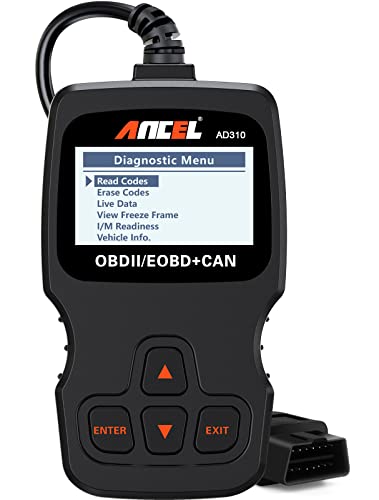
The ANCEL AD310 is a small, wired code reader for basic OBD-II work. It connects to the Prius diagnostic port and draws power from the car, so it does not need a separate battery. Its buttons and screen keep the process simple. I see it as a practical tool for checking common engine and emissions faults.
This scanner can read and clear standard diagnostic trouble codes on compatible vehicles. It can also show basic data such as code definitions and some readiness information. The direct cable avoids phone pairing and app setup. However, its main focus is the engine control system, not every electronic module in a Toyota hybrid.
Pros:
- Simple wired operation with no app or account
- Reads and clears many standard check-engine codes
- Uses a built-in screen for quick results
- Compact size fits easily in a glove box or tool bag
- Useful for checking emissions-related problems before a repair visit
- Does not rely on Bluetooth, cellular service, or phone battery
- Good low-cost choice for occasional home use
Cons:
- Limited coverage for Prius hybrid, ABS, SRS, and body modules
- The small screen shows less detail than a phone app
- The cable can feel less convenient than a wireless adapter
- It may not explain Toyota-specific codes in enough depth
What Amazon Buyers Are Saying
Amazon buyers commonly like the AD310 because it starts working as soon as they plug it in. Many users value the clear buttons, basic code display, and low learning curve. It suits drivers who want to check a check-engine light before deciding whether to visit a repair shop.
The main complaint pattern centers on limits rather than basic operation. Some buyers expect a low-cost OBD-II reader to scan every warning light, but standard readers often cannot access hybrid or safety modules. Buyers also need to read the vehicle instructions and understand that clearing a code does not fix the cause.
My Recommendation
I recommend the AD310 for a Prius owner who wants a dependable first check for a standard engine code. It is not my first choice for a hybrid battery warning or an ABS light. Buy it when you want a simple tool that works without a phone and keeps the cost down.
| Category | Rating |
|---|---|
| Ease of use | 4.5/5 |
| Standard code reading | 4.2/5 |
| Prius system coverage | 2.8/5 |
| Portability | 4.1/5 |
| Overall rating | 4.0/5 |
Veepeak OBDCheck BLE for Phone-Based Prius Scans

The Veepeak OBDCheck BLE takes a different approach. Instead of using a built-in display, it sends data to a compatible phone or tablet over Bluetooth Low Energy. You use a separate diagnostic app to read codes, view live data, and reset certain warnings. This design gives you a larger screen and more room for graphs.
Compatibility depends on both the adapter and the app you choose. iPhone users need an app that supports Bluetooth Low Energy adapters, while Android users should check Bluetooth and app support before buying. The adapter is mainly suited to standard OBD-II information, so I would not assume it can scan every Toyota Prius hybrid module.
Pros:
- Small wireless design stays connected under the dash
- Works with compatible iOS and Android diagnostic apps
- Phone screen can show larger code details and live data
- Useful for monitoring items such as coolant temperature and sensor readings
- Easy to store in the vehicle for quick checks
- Can support several apps, depending on each app’s features
- Good option for drivers who prefer digital reports and graphs
Cons:
- Requires a compatible app, phone, and Bluetooth setup
- Some apps charge separately or limit features in a free version
- Basic OBD-II access may not cover Prius hybrid or safety modules
- Wireless adapters can be less convenient if your phone has connection issues
What Amazon Buyers Are Saying
Common buyer feedback praises the Veepeak’s small size and its ability to work with popular phone apps. Users often like seeing live data on a larger display instead of reading short lines on a handheld scanner. Many also appreciate that they can choose an app that fits their own skill level.
The most common source of confusion is app compatibility. A buyer may connect the adapter correctly but select an app that does not support the device or the desired vehicle system. Reviews also show why it helps to check app costs and features first. The adapter supplies the link, but the app controls much of the user experience.
My Recommendation
The Veepeak OBDCheck BLE is a good value for Prius owners who already use a smartphone for car care. It is more flexible than a basic handheld reader for standard data, but it is not a guaranteed answer for hybrid-specific warnings. I would choose it for routine checks, live data, and light DIY work.
| Category | Rating |
|---|---|
| Phone setup | 4.0/5 |
| Live-data flexibility | 4.3/5 |
| Prius system coverage | 3.1/5 |
| Wireless convenience | 4.4/5 |
| Overall rating | 4.2/5 |
BlueDriver for Deeper DIY Prius Diagnosis
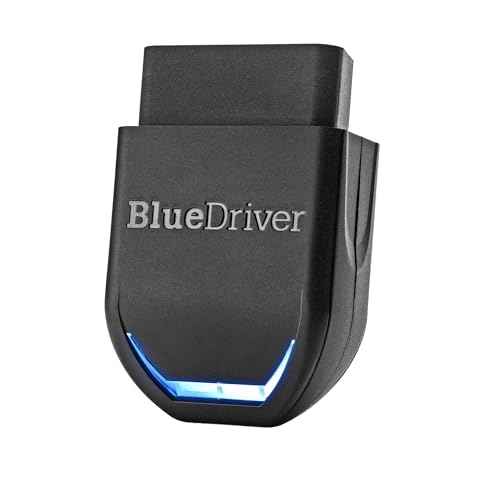
BlueDriver is the most capable option in this comparison for a DIY owner who wants more than a basic engine-code reader. It uses Bluetooth and a companion mobile app to provide code descriptions, live data, and repair-oriented reports. The listed feature set includes ABS, SRS, and TPMS scanning on supported vehicles, along with standard check-engine functions.
That wider coverage makes BlueDriver interesting for a Toyota Prius, since a warning may not come from the engine computer. Still, coverage varies by vehicle, model year, and system. I would confirm the exact Prius year and supported modules in the current app or product information before buying, especially if your goal is hybrid battery diagnosis.
Pros:
- Wireless connection works with iPhone and Android devices
- Provides more useful repair information than a simple code list
- Listed support for ABS, SRS, and TPMS on supported vehicles
- Shows standard engine codes and live vehicle data
- Repair reports can help connect a code with possible causes
- No ongoing subscription is listed for normal use
- Better fit for owners who want to learn and diagnose at home
- Portable design works across compatible vehicles
Cons:
- Requires a smartphone and the BlueDriver app
- Advanced coverage still depends on vehicle support
- It may not replace a Toyota dealer scan tool for every hybrid module
- More features can take time to understand
- Phone permissions and Bluetooth pairing may frustrate some first-time users
What Amazon Buyers Are Saying
Amazon buyers often focus on the app’s clear reports and the extra system coverage. Many users like getting more than a generic code number, since the report can give a better starting point for research. The wireless format also appeals to people who want to inspect data from the driver’s seat.
Feedback is not the same for every car. Some buyers expect dealer-level access to every manufacturer module, while the tool can only scan systems supported by the vehicle and software. App setup, phone permissions, and the difference between a standard code and a manufacturer code also appear as common learning points.
My Recommendation
BlueDriver is my top pick here for a serious DIY owner. It offers the broadest stated feature set of these three products and gives better context than a basic reader. I still would not promise full Toyota hybrid battery access without checking the exact Prius application. For general Prius troubleshooting, it is worth the higher cost.
| Category | Rating |
|---|---|
| App and report quality | 4.6/5 |
| System coverage | 4.2/5 |
| Prius DIY usefulness | 4.4/5 |
| Ease of setup | 4.1/5 |
| Overall rating | 4.4/5 |
How to Choose an OBD2 Scanner for Toyota Prius
Choosing an OBD2 scanner for Toyota Prius ownership starts with the warning light you need to investigate. A tool for a routine check-engine light does not need the same features as a tool for an ABS, airbag, or hybrid-system fault. Think about your Prius model year, your comfort with apps, and the type of repair work you plan to do.
1. Match the scanner to the Prius system
Start by asking which light is on. A standard engine light often points to the powertrain or emissions system. A basic reader may handle that job well. An ABS, SRS, TPMS, or hybrid warning can require access to a different control unit.
Read the product details for system coverage, not just the words “OBD2.” Look for clear support for your model year and the module you need. If the listing only says “read and clear engine codes,” assume that it may not scan the high-voltage battery ECU or other Toyota-specific systems.
Also check the difference between code reading and code clearing. Clearing a code turns off the stored warning in some cases, but the fault can return. It can also erase useful freeze-frame data. I prefer to record the code and symptoms before clearing anything.
2. Decide between a wired reader and a Bluetooth adapter
A wired scanner gives you the simplest setup. Plug it into the diagnostic port, turn on the car as directed, and read the screen. The ANCEL AD310 fits this style. It works well when you want a quick answer and do not want to manage a phone app.
A Bluetooth adapter gives you more room to view live data. A phone can show graphs, longer code descriptions, and saved reports. The Veepeak and BlueDriver use this approach. Before buying, check whether the adapter works with your phone and whether the required app includes the features you want.
Do not leave any Bluetooth adapter plugged in for long periods unless the maker supports that use. Some adapters draw a small amount of power while connected. Unplug it after testing if you will park the Prius for several days.
3. Compare live data, reports, and total value
Live data helps you see what the car sees right now. Useful readings may include engine coolant temperature, oxygen sensor data, fuel trim, engine speed, and other standard parameters. These readings can help you spot a sensor that behaves oddly, but they require careful interpretation.
A repair report can save time for a new DIY user. It may explain a code and list likely checks. Treat that information as a starting point, not a final diagnosis. The same code can come from a bad sensor, damaged wiring, a vacuum leak, poor power supply, or another related problem.
Finally, compare the full cost. A handheld scanner may need no app fee. A Bluetooth adapter may cost less at first but rely on app purchases for advanced functions. BlueDriver offers a more complete app experience, while the AD310 keeps the purchase simple. The best value depends on how often you will use the tool and how much information you need.
Practical Prius Scanning Tips
Park safely before you connect a scanner. Set the parking brake and keep the vehicle in the correct state for the test. Read the scanner instructions because some checks need the ignition on, while others need the engine running.
Write down the exact code. A code such as P0420 or P0A80 can point you toward a system, but it does not prove that one part has failed. Keep the code, mileage, warning lights, and recent repair history together. This record helps you explain the problem to a technician.
Use live data with care. A single number may look unusual because of engine temperature, driving load, or the way the app reports it. Compare readings with the repair manual or trusted technical data for your exact Prius year. Do not replace an expensive hybrid battery based on one generic scanner message.
After a repair, clear the code only when you have recorded the original information. Then drive through the required conditions and check whether the warning returns. Emissions monitors may need time to complete. A reset can also make a vehicle fail an emissions test until the monitors run again.
If the Prius shows a red triangle, hybrid system warning, brake warning, or a message about stopping the vehicle, treat it as urgent. A low-cost scanner may not access the needed module. Stop in a safe place and seek qualified help when the car shows unsafe behavior, loses power, overheats, or makes unusual sounds.
Final Verdict: Which Should You Buy?
BlueDriver is my best overall pick because it offers the richest reports and broader supported-system coverage. Choose the ANCEL AD310 for simple engine-code checks, or Veepeak for flexible phone-based live data.
The right OBD2 scanner for Toyota Prius depends on your warning light and model year. Check system support before purchase, and use every code as a clue rather than a final diagnosis.
FAQs Of Best OBD2 scanner for Toyota Prius
Will an OBD2 scanner work with every Toyota Prius?
Most U.S. Prius models from 2001 onward use an OBD-II port. However, scanner features vary by year and control module, so check compatibility before buying.
Can a basic OBD2 scanner read a Prius hybrid battery code?
Usually, a basic reader focuses on standard engine and emissions codes. Hybrid battery and other Toyota-specific faults may need a scanner with supported enhanced coverage.
Where is the OBD2 port on a Toyota Prius?
The port is usually under the driver-side dashboard near the steering column. The exact trim location can vary slightly by model year.
Is Bluetooth better than a wired Prius code reader?
Bluetooth is better for phone graphs, live data, and reports. A wired reader is easier if you want quick checks without pairing a phone or using an app.
Can I clear a check-engine light with an OBD2 scanner?
Many scanners can clear standard codes after you record them. Clearing the light does not repair the fault, and the warning may return if the problem remains.

I am Julian Drive, an automotive enthusiast and repair expert with over 7 years of hands-on experience in vehicle maintenance. At Carora Hub, I simplify complex car issues into easy-to-follow DIY guides to help drivers stay safe and save on repair costs.